WebViewer and Released Database Mode
WebViewer and released documents
Four options manage restrictions connected to released documents.
First let's see what new features they introduce. The features are all role-dependent, which means that in a normal installation they apply only to some users in accordance with DBWARM settings
oAllow the download only of released versions of documents
oAllow the download only of documents currently released
oDon't allow users to download and save the files
oConnect to the released database where available
Now the details:
Allow the download only of released versions of documents
This option makes sure that what you download has been previously approved. There are two main scenarios:
You're not using a Released database
You query the database and get the results as usual. The results include work in progress documents (check-in, check-out) and documents never approved. The preview, though, is an image of the last released version if there is one, or the current work-in-progress if the document has never been approved. If the document has not been approved you can't download it. If the document has been approved then you can download directly only the last version approved (others are available, as usuaul, in the history dialog). The same is true for eDrawings previews and SolidWorks previews.
Pros |
|---|
You needn't setup a released database |
Cons |
The batch download will possibly include files never released to allow the user to open the assembly finding all the files The composed of/used by views do not reflect the hierarchical structures you download becuase, for instance, new parts may have been added to the assembly in the meanwhile during the check-in/check-out process. |
You're using a released database
You can only see released documents. The difference is that if you haven't defined a specific storage for released documents you download the released version of the documents and not the work-in progress ones. The same is true for static preview, eDrawing previews, etc... If you intend to use the released database only for WebViewer, you avoid traffic over the network to copy the released documents and save disk space.
Pros |
|---|
You needn't define a separate storage for released documents |
Cons |
The batch download is disabled |
Allowing separate drive mappings for users having access to the released database
If you use a separate storage for released documents then you'll probably need to use separate drive mappings for the users that must have access to files from the WebViewer interface. The setting that determines if you are using released database access for some users is WebViewer custom right 4 in the WebViewer tab of DBWARM.
How to set separate drive mappings for released database users
The released database ODBC must be located in the System DSN and must be named DBWORKS_RELEASED. Display the content of the directory C:\Program Files\DBWORKS Stand Alone\WebViewer or equivalent on the Web Server that hosts the WebViewer server components. You'll find a file named 'driveMappings.txt' which contains the drive mappings for current WebViewer users. Create a copy of the same file in the same directory and call it 'driveMappingsReleased.txt', then edit it to add/modify the settings.
The valid format is a drive letter followed by a tab and the UNC path as in
Z \\newweb\c
H \\My test server
After saving, display the component services from control panel, administrative tools and restart the COM Plus component WebViewerStaticServer
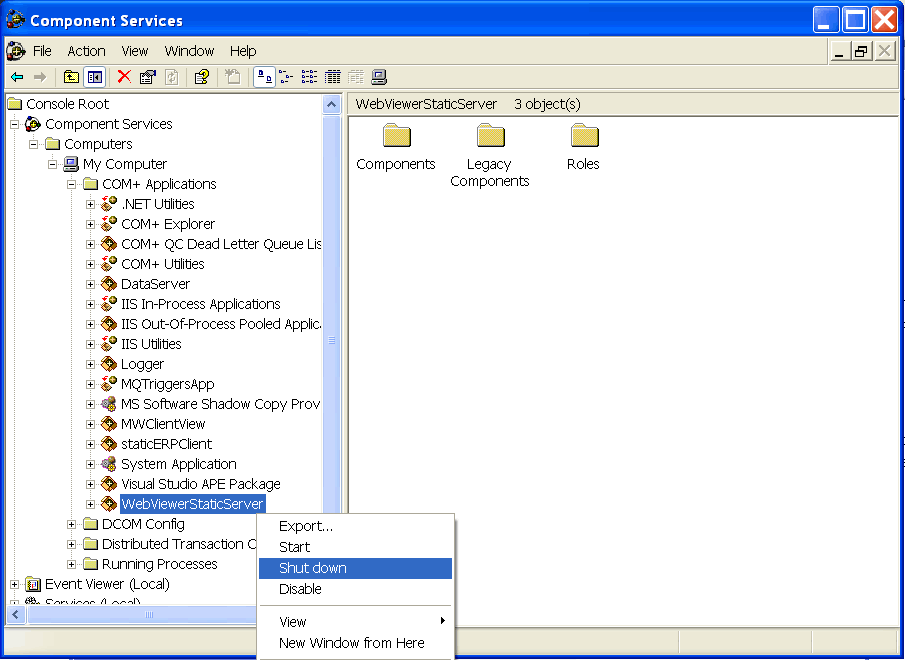
To confirm the correctness of the file contents, login with any user to WebViewer and open the log file with the date of today in the directory 'C:\Program Files\DBWORKS Stand Alone\WebViewer\Log' or equivalent. Near the end of the file you should find the lines of the initialization of the server component that include the scanning of the drive mappings.
The sections are named
Drive mappings: Drive mappings for released only users:
and contain the mappings; mappings could be listed twice, which is not an error.
Allow the download only of released versions of documents
This option disables the doanload of any kind (inluding eDrawing previews) for documents that to the clent appear not in released state. If you're connected to the released database this doesn't really make a difference because to you alla documents are released.
If you're connected to the main database, though, the fact that the document is, say, in check-out might mean that the last approved version was wrongly approved and that the document is being edited in order to fix it.
This option is very restrictive as it keeps you from downloading also previews revisions of documents being currently modified not because they were 'buggy' but because for whatever reason a new version is required.
Don't allow users to download and save the files
This option removes the entry 'download' which requires where to save the documents. The documents are downloaded using the 'download and open' command and opened. As a matter of fact a person could open in this way a part, then do a Save As to maintain a local copy wherever he/she desires, so this does not grant absolute security but at least manages the files in the file system transparently keeping the user from having direct access to them.
Connect to the released database where available
This option looks for a DSN called DBWORKS_RELEASED and, where available, queries that data source. The immediate effect is that oall the documents visible on the client are in state released. Also, the record viewed is the one of the released documents at the time of approval, probably different from the current one. Also, the composed of/used by views reflect the situation at the time of approval. When this option is selected it is stronglu recommended that the first option is checked, to make sure that the files downloaded and the previews display the documents as they were when approved.
Suppose your company have a released database set up and you want all the WebViewer users (normally out of the designging team) to have access only to released documents. Then you can connect to the released database by setting the DSN value in the dbwconn.par of the Stand Alone on the server
This option make sure that you get connected to the released database only when needed. When it comes to getting the rights (DBWARM) settings or the projects assigned to the users, WebViewer gets connected to the main database avoiding the risks due to possible discrepancies.
Mind that if you set up a released database for the first time, only the released documents are being copied, so you may find out that there are a lot of documents missing. The record for those documents and the related information in the other tables are added when the documents currently in a work-in-progress state are being released.
Use released tables for all the users
If in your installation you make use of released tables instead of a distinct database and you want all the users to connect to the released tables, add to the options in WebViewerOptions.txt the line
USE_RELEASED_TABLES 1
Setting the options in DBWARM
The options associated with the released database and download of previous released versions are in the custom section of the rights.
Name displayed in DBWARM |
Meaning |
|---|---|
WebViewer Custom right 1 |
Allow the download only of released versions of documents |
WebViewer Custom right 2 |
Allow the download only of documents currently released |
WebViewer Custom right 3 |
Don't allow users to download and save the files |
WebViewer Custom right 4 |
Connect to the released database where available |
The image displays a typical setup for an installation where the users beloging to the group get the data from the released database and display only approved documents.
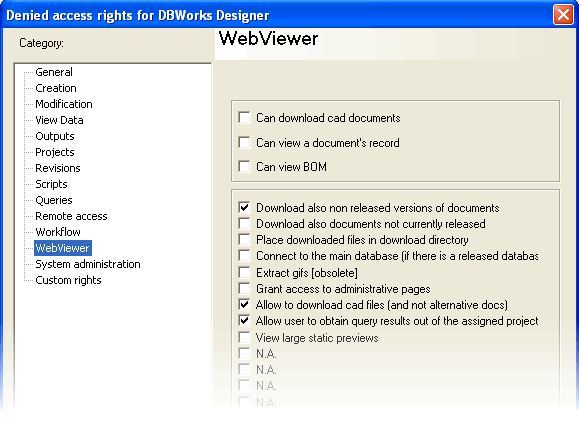
The image displays a typical setup for an installation where the users beloging to the group get the data from the released database and display only approved documents.