Visual Cues
WebViewer supports Visual Cues in a limited way.
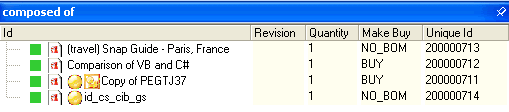
In the grids the Cues are always displayed in the ID field. The icons are resized to fit the standard height of the grid and may look a bit smaller than in DBWorks. The file types suported for the images are only .bmp, so other icons available as, say, .tif files must be converted and the parametric file updated to reflect the new file name of the icon. Note that in order to see the cue the field used for pattern matching must be included in the resultset displayed in the grid.
The location of the icons are on the left side, just after the icon that indicates the document type. The text with the ID is shifted to the right to make space for the added icons.
For trees, the Visual cues are supported on every field of the DOCUMENT table.
Currently the Visual Cues based on SQL conditions rather then patterns in field values are ignored.