Limit fields in Custom Conditions search
Limit fields in Custom Conditions search
You can limit the searchable fields in the Custom Conditions. To set the list of fields create a text file named FieldsList.txt in the standard DBWorks StandAlone\WebViewer directory on the web server that hosts WebViewer.
The file content is a simple list of all the fields that can be displayed in the search list. Comments can be added as lines that start with ';'
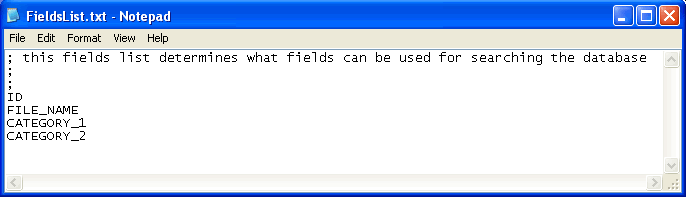
Every field must be enlisted only once. If the fields don't exist in the database the are filtered out at runtime.

In this case, for instance, the two fields CATEGORY_1 and CATEGORY_2 do not exist in the database and they are therefore not displayed in the drop down list of the fields.
Specification of separate fields lists for users and groups of users
If you want to set a specific fields list for a user or a group of users (as defined in DBWARM), define the same text file in the subdirectories under WebViewer/Groups or WebViewer/Users.
Suppose you want to specify a fields list for the users belonging to the group 'DBWorks Admin' then create the directory C:\Program Files\DBWORKS Stand Alone\WebViewer\Groups\DBWorks Admin or equivalent in your Stand Alone installation on the web server. In this directory create a file named FieldsList.txt as above with a list of fields.
Suppose you want to specify a fields list for the users belonging to the group 'John' then create the directory C:\Program Files\DBWORKS Stand Alone\WebViewer\Users\John or equivalent in your Stand Alone installation on the web server. In this directory create a file named FieldsList.txt as above with a list of fields.
The order in which the files specifying fields list are taken into consideration is:
oparametric file for the specific user
oparametric file for the group to which the user belong
ogeneral parametric file valid for all users
ono parametric file which means that all users see all the fields in the database
If you define a specific parametric file for user 'John' and no other parametric file, neither for groups nor in the root, the user John sees the specific list set while all the other users see all the fields.