Administrator page
Administrator page and licenses
In the same directory as the other web pages, is a page named admin/login.asp. This is a very special page as it should be made available only to administrators. You should either move this page to a protected directory or set specific rights on this page so that only a restricted numer of users can have access to it. You can easily change the NT rights on the page or on a directory to specify who has access on this page.
If you want to move the page to another directory, move to the same directory also the file adminReport.xsl .
Licensing system
Licenses are floating, meaning that the license is occupied from the moment when the user logs in until the moment he closes his browser page or moves to another page (the WebViewer client is unloaded). In this case a small window pops up to confirm that the user has been logged off. If you have on your computer a pop up window blocking system, the user is not logged off instantly and will be automatically logged off after approximately 5 minutes by the server.
It is also possible to set a temporization so that an idle user is automatically logged off after a given number of minutes.
Page content
This page provides information on the installation and on the users currently logged. The page must be accessed with Internet Explorer 6. This is a sample of the page:
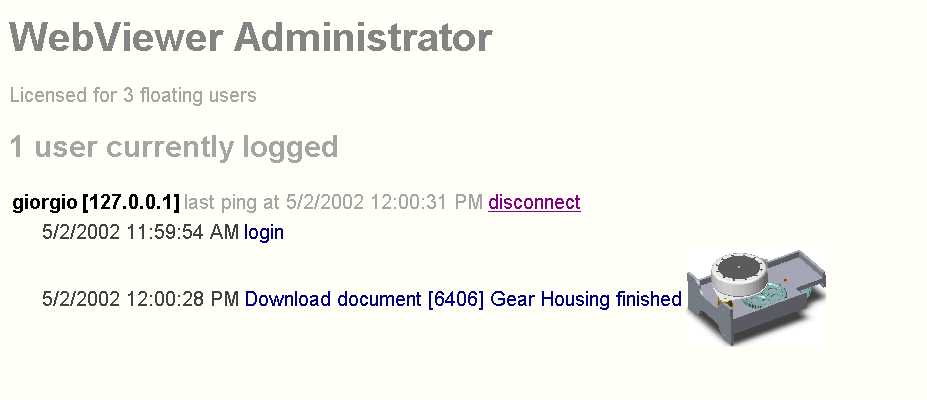
Under the title the first information available is the maximum number of floating users. When this number is reached, the next user who tries to log in is notified that he cannot because there are no licenses available.
Below is the number of users currently logged.
Download log of the day from the server
A link allows to download a zip containing the log of the day from the web server for debugging purposes.
For each user the following information is provided:
ouser name, as in DBWARM
oIP address
olast ping
The client pings the server periodically to verify that the connection is active. If you are experiencing network problems refreshing the page after 1 minute the ping won't change. This could be due to network traffic or failure to log off properly. In the latter case the server will log off the user automatically after 5 minutes. If a user keeps a WebViewer client page open and doesn't perform any action, his license remains occupied.
odisconnect command
The administrator may require urgently a new user to connect when all the licenses are currently occupied. In this case, he can disconnect one of the connected user making a license available for a new connection. The user that's being disconnected will receive an error notification in a matter of seconds and will have to try to reconnect. He will succeed as soon as a license is made available for him.
oactions
For each action of the currently connected users, you can see a report that displays login, record vieweing and complete file download. For the download, the action is logged when the download starts and does not imply that the download was completed.
oWhere available, a thumbnail picture of the document being downloaded is displayed, identifying the document at a glance.