Server Scripts
Server scripts
There are two types of scripts: synchronous and asynchronous scripts. The synchronous scripts provide quick feedback to the user but are not bound to fulfill the request and can delegate the task to the asynchronous scripts. The asynchronous scripts on the othe hand perform heavier tasks that are queued on the server until completion. Once the tasks has been fulfilled, the user that started the process receives a notification and automatically downloads the files created by the scripts.
Understanding the normal workflow through a simple example
A user requests the creation of a pdf file for a given drawing. The synchronous script is executed immediately. Its task is to find out if it is possible to fulfill the request immediately and provide the files to the user (for instance if the files were created by a previous user request) or the task must be delegated to a queued asynchronous script, in which case the user is notified that the files need to created and informed on the position of the new task in the queue of tasks on the server.
At this point either the user downloads the files immediately or he has a fair idea of how long he'll have to wait. If he needs those files to continue working he can decide to close the WebViewer client and do something else; after he finished his secondary occupation, when he opens the WebViewer client and logs in, the application starts downloading the requested files automatically.
To sum up, these are the schematized differences between the two types of scripts:
synchronous scripts |
asynchronous scripts |
|
|---|---|---|
timing |
immediate |
queued, postponed |
goal |
provide immediate feedback |
fulfill the request |
location |
on the web server |
on any workstation |
The queue mechanism for the asynchronous scripts
If the first script delegates the task, this is queued on the web server. The second script, the one that fulfills the request does not necessarily run on the web server. It is indeed possible to activate several Tasks Client that ping from other workstations for unattended tasks to execute. When one of these workstations finds a new task it checks the task out and starts executing the script locally. Once the script is completed succesfully it uploads the files on the web server and makes them available for the original user to download. The advantages of this system is that if one user goes on holiday, it is possible to 'recycle' his workstation as a WebViewer task executor for the team without having to install any application on his workstation. His workstation would be made a print server or a pdf server or a BOM server for the entire company. Note that since the file adresses are expressed in UNC paths, the tasks client does not require to have the same drive mappings as the server and could therefore a workstation that does not have DBWorks installed.
The API available to the synchronous scripts
Ideally the scripts should be kept simple and readible. With this goal in mind some variables and objects are automatically made available to the script in order to provide information on the document for which the request was made and some functions that provide basic file control feature.
Variables
The variables are exposed as normal VBScript variables and contain information on the document being processed
id |
the ID of the document for which the request was issued on the client |
|---|---|
uid |
the UNIQUE_ID of the document for which the request was issued on the client |
uncPath |
the complete location in UNC format of the document for which the request was made It is recommended to use this variable for every file operation |
ObjectsThe rsdoc object
This object is of the type ADODB.Recordset, it's disconnected (and so it cannot be used to update the database) and contains only one record: the record of the document for which the request was made. Typically you can use this recordset to retrieve each field value for the document. We assume you are familiar with the ADO API for the Recordset object; if you're not you can find many examples of data retrieval from a recordset in the demo scripts provided with DBWorks.
The FileResult object
A complete reference can be found in the dedicated help module for the API.
Briefly, the features offered by this object are:
osend feedback to the user, either a message or a warning
ocompare the document file with created output files to avoid unnecessary work load and provide immediate feedback
odecide wether the task is fulfilled by the script or is delegated to a separate tasks that will be queued
oset a list of files to be downloaded automatically by the user
The API available to the asynchronous scripts
Variables
The variables are exposed as normal VBScript variables and contain information on the document being processed
id |
the ID of the document for which the request was issued on the client |
|---|---|
uid |
the UNIQUE_ID of the document for which the request was issued on the client |
uncPath |
the complete location in UNC format of the document for which the request was made It is recommended to use this variable for every file operation |
ObjectsThe rsdoc object
This object is of the type ADODB.Recordset, it's disconnected (and so it cannot be used to update the database) and contains only one record: the record of the document for which the request was made. Typically you can use this recordset to retrieve each field value for the document. We assume you are familiar with the ADO API for the Recordset object; if you're not you can find many examples of data retrieval from a recordset in the demo scripts provided with DBWorks.
The ScriptResult object
A complete reference can be found in the dedicated help module for the API.
Briefly, the features offered by this object are:
osend feedback to the user, either a message or a warning
ocreate pdf, dwg, dxf output from a SolidWorks drawing
oset a list of files to be downloaded automatically by the user
odisplay on the tasks client workstation some interface feedback on the operations being performed
Seetting the script
...\customMenus.xml
In this tutorial we make use of the free tool Microsoft XMLNotePad to edit the xml file that defines the menu entries. The tool is feeware and can be downloaded, among others, at http://www.snapfiles.com/dlnow/dlnow.dll?Inc=No&ID=103924 . As the name suggests, the tool is simple and easy to use, in any case any xml editor will do the job.
Let's see the structure of a basic one-command file first, both in the application and in Internet Explorer:
|
|
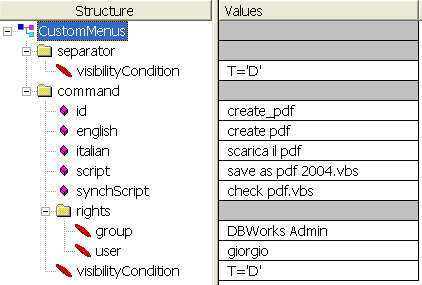
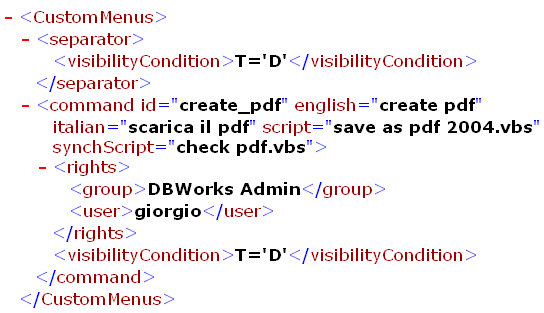
Let's analyze the content:
at level1, under the xml root, you can add one or more menu separators and/or menu commands. Each of these is represented in tehe xml by an element.
menu commands
The tag name must be 'command'. The attributes available for the element are:id to identify the commandenglish, italian german to set the menu caption depending on the language (english is mandatory)script to indicate the name of the script executed on the server as an asynchronous tasksynchScript to indicate the name of the script executed on the server as a synchronous taskvisibilityCondition to indicate under what SQL condition this command should be visible. If omitted, always visiblegreyedCondition to indicate uder what SQL condition this command should be greyed. If omitted, never greyed
In XML Notepad attributes are outlined with a pink oblique square, elements with a folder if it has children or a red oblique ellipse otherwise.
The difference between the synchronous and asynchronous script and how the are called is explained in the topic 'server side scripting'
Setting the rights
The rights rely on the DBWARM definition of users and groups. As in Windows, you can authorize or deny visibility based both on user and group. The available tags, that must be under the rights element are
denyUser |
the command is not visible for the user |
|---|---|
user |
the command is available for the user |
denyGroup |
the command is not visible for the members of the group |
group |
the command is available for the members of the group |
and are scanned and considered exactly in this order, no matter the order you set for the children of the rights element.
This priority order has been set for the sake of caution: if you deny a user from a key command (could be for instance 'approve remotely') you probably don't want any other setting to overrule this decision, no matter the group.
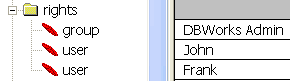
Each rule must be set in a separate element, so if you want to enable both users John and Frank you need to create two lines such as in
If you want everybody to have free access, don't set any rights, but if you set some then the default is that an unlisted user not belonging to an unlisted group does not have access to the command.
dividers
For the divider the only attribute available is visibilityCondition, which is an SQL condition.
subMenus
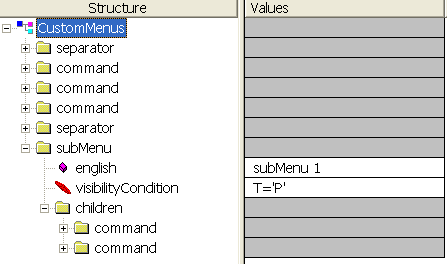
The subMenu element can contain attributes for languages a visibilityCondition element and a rights element (as for the commands)
Languages Supported
Currently, our platform supports VBScript, PowerShell, and Python. We have expanded our offerings to include Python due to Microsoft's plans to phase out VBScript in future Windows releases. For more details on VBScript's deprecation, please refer to Microsoft's official announcement: VBScript Deprecation: Timelines and Next Steps.
Debugging in Python
Python provides robust debugging capabilities through various tools and integrated development environments (IDEs). One of the primary tools is the built-in Python Debugger, pdb, which allows for interactive source code debugging. With pdb, you can set breakpoints, step through code line by line, inspect stack frames, and evaluate expressions in the current context. To utilize pdb, insert the following line at the desired breakpoint in your code:
import pdb; pdb.set_trace()
Alternatively, starting from Python 3.7, you can use the built-in breakpoint() function:
breakpoint()
Upon execution, the debugger will activate at these points, allowing you to inspect variables and control the flow of your program. For a comprehensive guide on using pdb, refer to the official Python documentation: pdb â The Python Debugger.
Additionally, many modern IDEs, such as Visual Studio Code, offer integrated debugging tools that enhance the debugging experience with features like visual breakpoints, variable inspection, and interactive consoles. For more information on debugging Python with Visual Studio Code, visit: Python debugging in VS Code.
Logging in Server Scripts to Web Client log files
For scripts executed within the Web Client Server environment, a dedicated logging mechanism is available through the file_system_service object. Developers can log messages using the following method:
file_system_service.LogMessage("my message")
This command generates a log entry in the following directory:
C:\Users\Administrator\AppData\Roaming\MechWorks\WebClient\TasksClient\Log
where Administrator refers to the username defined in COM Plus for the additional component used by the system.
Logging in Debug Mode
When debugging Python applications, it is often useful to generate log files that record detailed execution information. Python provides a built-in logging module that allows developers to log messages at different severity levels, such as DEBUG, INFO, WARNING, ERROR, and CRITICAL.
To enable logging in debug mode, you can configure the logging system as follows:
import logging
# Configure logging to write to a file
logging.basicConfig(
filename='app_debug.log', # Change this path if needed
level=logging.DEBUG, # Capture all messages at DEBUG level and above
format='%(asctime)s - %(levelname)s - %(message)s'
)
# Example usage
logging.debug('This is a debug message')
logging.info('This is an informational message')
logging.warning('This is a warning message')
logging.error('This is an error message')
logging.critical('This is a critical error')
The above configuration creates a log file named app_debug.log in the current working directory by default. If you need to change the log file location, modify the filename parameter in basicConfig to specify the full path.
Standard Log File Locations
The default location where log files are stored depends on the operating system and the configuration of the application. Some common standard locations include:
oWindows: C:\Users\YourUser\AppData\Local\YourApp\logs\ or C:\ProgramData\YourApp\logs\
For applications that follow standard logging practices, it is recommended to allow users to configure the log file location via environment variables or configuration files.
Best Practices for Debug Logging
oUse DEBUG level logs only during development and testing, and avoid excessive logging in production.
oUse a rotating log handler (logging.handlers.RotatingFileHandler) to prevent logs from growing indefinitely.
oMask sensitive information (such as passwords or tokens) before logging.
oUse structured logging formats such as JSON if logs need to be processed programmatically.
For further details, refer to the official Python logging documentation: Python Logging Module.
Objects exposed in the scripts
AutoNumberService Object
The auto_number_service object provides functionality to retrieve and increment an auto-number counter within a database table. It ensures thread-safe handling of the numbering system by using a locking mechanism. The service interacts with an ADODB database connection to manage sequential numbering associated with specific document prefixes.
Methods
int GetAutoNumber(string table, string docPrefix, int loopCount = 100)
Description: Retrieves and increments the auto-number counter for the specified prefix. If the record does not exist, it creates the table and inserts the initial record.
Parameters:
otable (string): The name of the table containing the auto-number counter.
odocPrefix (string): The prefix used to identify the record.
oloopCount (int, default: 100): Maximum retry count when waiting for a locked record to be released.
Returns: (int) The next auto-incremented number.
void Close()
Description: Closes the ADODB connection if it is open.
db_service Object
Overview
The DbService object provides various database-related functionalities, including retrieving localized values, accumulating recordset updates, retrieving string field data, and managing category configurations. It interacts with an ADODB database connection to perform these operations.
Methods
DbService(string dataSource, string user, string password, XmlMessagesServer mm)
Description: Initializes the database service by opening an ADODB connection.
Parameters:
odataSource (string): Connection string specifying the data source.
ouser (string): Username for authentication.
opassword (string): Password for authentication.
omm (XmlMessagesServer): Instance of XmlMessagesServer for localized message retrieval.
string DBWLookup(string code)
Description: Retrieves a localized version of the given code using the XmlMessagesServer.
Parameters:
ocode (string): The key for the localized value.
Returns: (string) The localized message corresponding to the given code.
void DBWOutput(string fieldName, object valueAssigned)
Description: Stores a field-value pair in an internal dictionary instead of updating the recordset immediately.
Parameters:
ofieldName (string): The name of the field to update.
ovalueAssigned (object): The value to be assigned.
void DBWOutput(Recordset rsDocument, string fieldName, object valueAssigned)
Description: Updates a field in the provided recordset.
Parameters:
orsDocument (Recordset): The recordset to update.
ofieldName (string): The name of the field to update.
ovalueAssigned (object): The value to assign to the field.
bool DBWGetStringFieldData(string table, string fieldToRead, string key, object keyValue, out string result)
Description: Retrieves a string value from a specified table based on a given key.
Parameters:
otable (string): The name of the table.
ofieldToRead (string): The field from which to retrieve data.
okey (string): The key field used to locate the record.
okeyValue (object): The value of the key field.
oresult (out string): The retrieved string value.
Returns: (bool) true if data is successfully retrieved, otherwise false.
CategoryMakerConfig LoadCategoryMakerConfig()
Description: Loads and parses category configuration values from the database.
Returns: (CategoryMakerConfig) An instance of CategoryMakerConfig populated with values from the database.
object[] ReadCategoryFieldsLinks()
Description: Retrieves category field links and their count.
Returns: (object[]) An array containing field names and the count of categories.
void CloseConnection()
Description: Closes the ADODB connection if it is open.
file_system_service Object
Overview
The file_system_service object provides file system-related functionalities such as logging messages and creating directories. It ensures compatibility with UNC paths by leveraging the LicensesManager service.
Methods
void LogMessage(string msg)
Description: Logs a message to the system log using the static logging mechanism.
Parameters:
omsg (string): The message to be logged.
bool DBWCreateDir(string strPath)
Description: Checks if a directory exists and creates it if necessary. The directory path is converted to a UNC path before processing.
Parameters:
ostrPath (string): The directory path to be verified or created.
Returns: (bool) true if the directory exists or was created successfully, false otherwise.