Server Side stamps for EDrawings in Web Client

Advantages
Affordable and quick:
oYou need only one license of EDrawings Professional.
oThe EDrawings created are small and cached for optimal performance.
Limitations
oIt applies only to EDrawings of type Drawing and not to Parts or Assemblies.
oIt is not compatible with restrictions on released documents: the EDrawings file sent back is always coming from the current version of the document.
oIt is not compatible with displaying EDrawings of previous revisions.
oServer side caching must be active to avoid recreating the files very often.
oIn general the first creation of an EDrawings preview is slower because of the process that includes running a script on another workstation and applying the markup.
oThe EDrawings are not automatically opened and must be doble clicked in the download window.
Requirements
oA Tasks Client must be active server side. Could be the web server itself, but it shouldn't be for workload and performance reasons.
oThe Tasks Client server side must have EDrawings Professional installed.
How it works
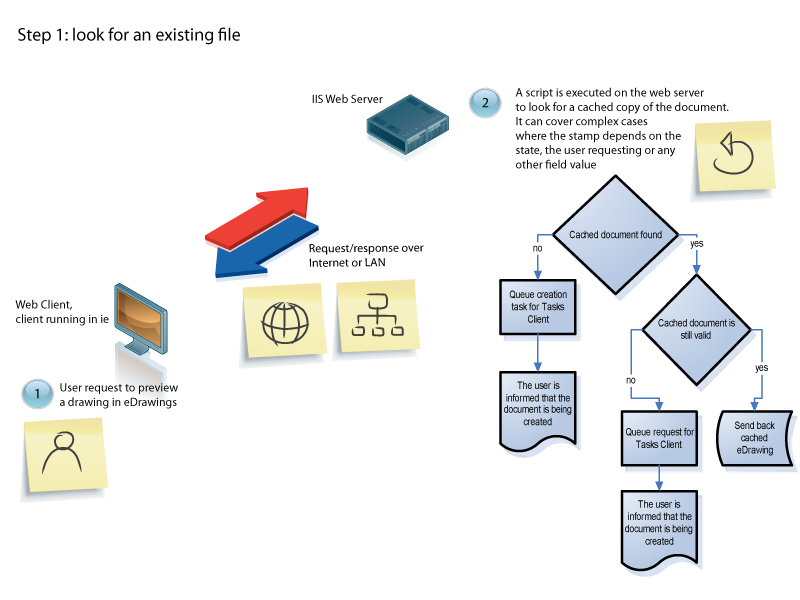
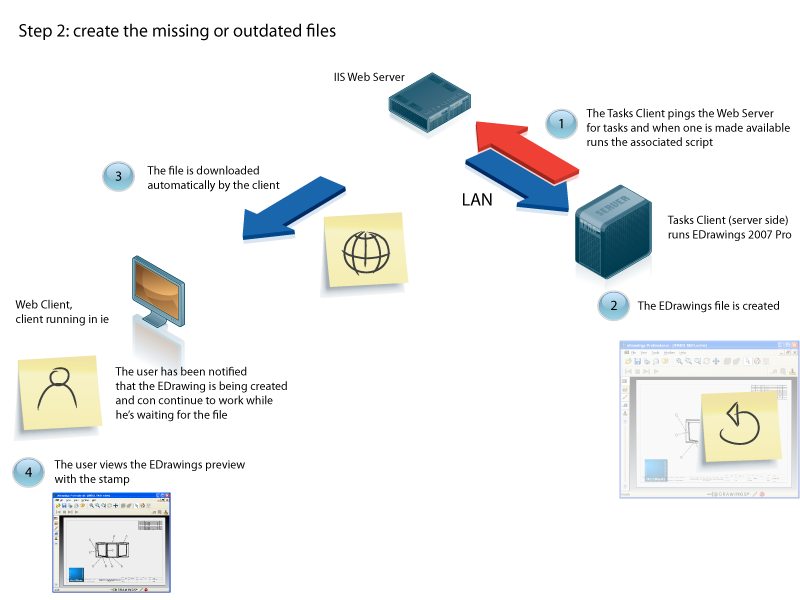
The mechanism makes use of the Server side scripting framework already in place. When the option is active every command that would normally generate a simple EDrawings creation and download is redirected to a custom server side action that not only creates the EDrawings file but enables also the insertion of stamps.
Custom server side actions have two phases, both associated with a script being executed:
oOn the web server: check if the file we're looking for is already there and if it is, send it back to the client immediately.
oOn the Tasks Client: create the file and add the stamps on each sheet.
The choice to implement both phases as scripts grants flexibility and allows to have stamps can differ depending on the state of the drawing or on the user requesting the preview.
Setting up the system
To activate the option open the file
...\program files\DBWorks Stand Alone\WebViewer\WebviewerOptions.txt
and add the line
markup_script "stampEDrawing"
Then open the file
...\customMenus.xml
and add the following entry

or send an e-mail with a request for the tag at [email protected]
Finally, create the two scripts that handle the request for cache control and for creation of the file.
In accordance with the xml entry, the scripts must be called 'chkStampEDrawings.vbs' and 'StampEDrawings.vbs'.