Briefcase Advanced Options
Put into Briefcase
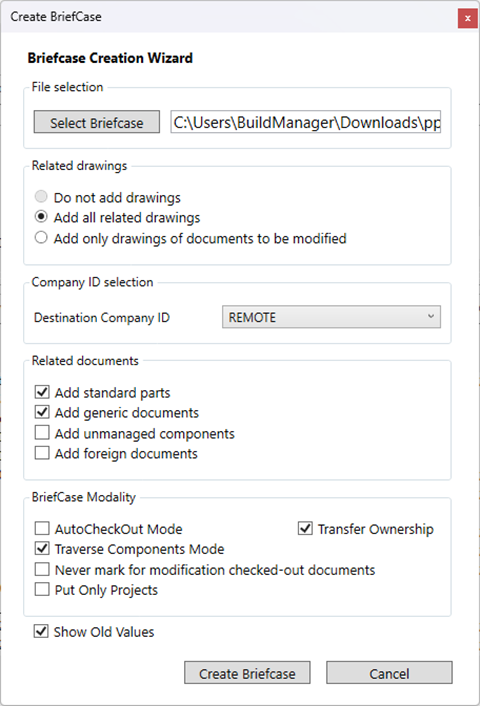
The button allows to select a file name for the briefcase that's about to be created.
•Do not add drawings
•Add all related drawings
•Add only drawings of documents to be modified
The Destination Company ID combo allows to choose the target company from the list initialized when enabled the Remote Access Mode (tipically through the Admin Tools→Remote Access→Company ID Manager).
•Add standard parts
Include also standard parts
•Add generic documents
Include also no CAD documents
•Add unmanaged components
Include also documents excluded from revision lifecycle (options→Revisions→Manage revisions only for documents within the following directories)
•Add foreign documents
Include also documents belonging to other companies (and so resulting foreign on the current site)
AutoCheckout Mode and setting the files to be modified
The AutoCheckout Mode (by default active) allows only checked-out components to be inserted into a Briefcase.
This would require that the components to be modified (if any) are known before sending the Briefcase.
With the AutoCheckout Mode turned off, it is possible to send Briefcases containing components that could be modified to the designers without knowing beforehand exactly which ones are to be edited.
Transfer ownership
To be used with "Autocheckout=OFF"
If checked, the documents marked for modifications become foreign; it is like controlling the Remote Access ownership by sending a document for modification to a different company/external designer.
The concept is that the document is foreign until any external designer sends it back to the original company
Traverse component mode
if checked, adds to the briefcase all the sub-components of an assembly
Never Mark for Modification Checked-out Documents
This option (by default unchecked) avoids, when checked, the automatic marking as 'to-be-modified' of all the new and checked-out documents.
Put only project
Exports only project structure, without any document.
When checked, all the sub-projects are always inserted independently of the option  Traverse components.
The difference is that:
|
no Project’s child DOCUMENT records are inserted in the briefcase |
|---|---|
|
all the Project’s child DOCUMENT records are inserted in the briefcase |
|
this combination should be used when sending a whole project structure to an external company, with the purpose of rebuilding only the project structure in an empty database |
|
This combination should be used for saving and sending a snap-shot of the database, to be used for restoring Project↔Documents association that may have been lost |
Get from the Briefcase
Autocheckout mode
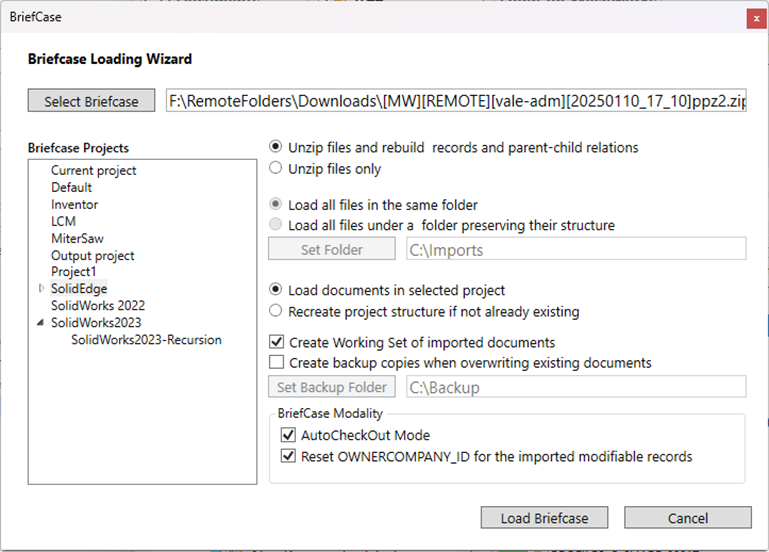
if checked, only documents in check out state can be put into a briefcase while documents marked for modifications and not in check-out state, are automatically checked out.
The Autocheckout mode is obsolete, and should never be set
This working mode must be known to the Get-from-Briefcase functionality, even if with Briefcases written after 20040630, this value is automatically read from the DBW_BC_INFO.TXT options file, embedded in every briefcase file
Reset OWNER_COMPANY_ID for the imported modifiable records
When this option is checked, every imported and modifiable document have the OWNER_COMPANY_ID reset to NULL, forcing the document to be fully proprietary, and not marked as to-be-returned-back.
The OWNER_COMPANY_ID field can contain the value of the sender of the document.
This options is to be used typically together with the Transfer ownership of the Put-into-briefcase function.
Note:
When using both the Transfer Ownership and the Reset OWNER_COMPANY_ID for the imported modifiable records, it is mandatory to check the option Environment->Remote Access->[X] Make foreigh documents with a not null OWNER_COMPANY_ID
Basically, the models that can be implemented with the Briefcase tool are:
1) Send documents as REFERENCE documents to other companies
Put-into-briefcase:
 Autocheckout mode
Transfer ownership
Never mark for modification checked-out documents
Get-from-briefcase:
Autocheckout mode
Reset OWNER_COMPANY_ID for the imported modifiable records
2) Send documents for modifications; the documents to be modified are ALREADY KNOWN; the External designer CAN NOT modify documents outside of the set decided by the Main company
Put-into-briefcase:
Autocheckout mode
Transfer ownership
Never mark for modification checked-out documents
Get-from-briefcase:
Autocheckout mode
Reset OWNER_COMPANY_ID for the imported modifiable records
3) Send documents for modifications; the documents to be modified are NOT KNOWN; the External designer, evaulating the changes needed, CAN modify documents outside of the set decided by the Main company
Put-into-briefcase:
Autocheckout mode
Transfer ownership
Never mark for modification checked-out documents
Get-from-briefcase:
Autocheckout mode
Reset OWNER_COMPANY_ID for the imported modifiable records
4) Transfer the ownership of a set of documents to a different company/External designer; the External designer has the freedom to add/remove components and to APPROVE the documents sent, since they are of his own ownership ( this is the model used in the Bosch implementation )
Put-into-briefcase:
Autocheckout mode
Transfer ownership
Never mark for modification checked-out documents
Get-from-briefcase:
Autocheckout mode
Reset OWNER_COMPANY_ID for the imported modifiable records
No Traverse Components Mode
This option (by default checked) determines if the children of the documents are added to the briefcase.
By default it is active, but we advice to uncheck it if you need to update only the assembly.
Documents sent back as a reference
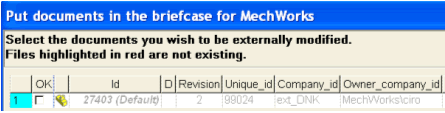
When creating the send-back briefcase, if the documents are not checked in the Document Selector Dialog, they are sent back for reference purpose only, so only updating the files on the main company site.
This can be desireable when the main company requests an update of the parts before the full completion of the assigned work.
Example
Document sent back definitively (work completed): 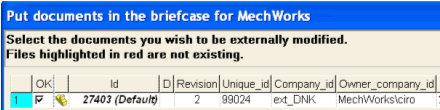
Document sent back as reference (work in progress):
Backup files on GET
An advanced option in the GetFromBriefcase Input Form permits to assign a folder for backing up the original existing files before overwriting them with those extracted from the briefcase.