 Delete records
This command is available only in Open for Updating browser mode
Select one or more documents in a grid.
In a tree view the operation deletes the entire branch.
You are allowed to delete not only the record, but also the document itself (the file) checking the option below the list.
The function removes also all the read-only and hidden files like that of the revisions of the document and cannot be undone. Use this command with extreme prudence.
A dialog displays the marked records.
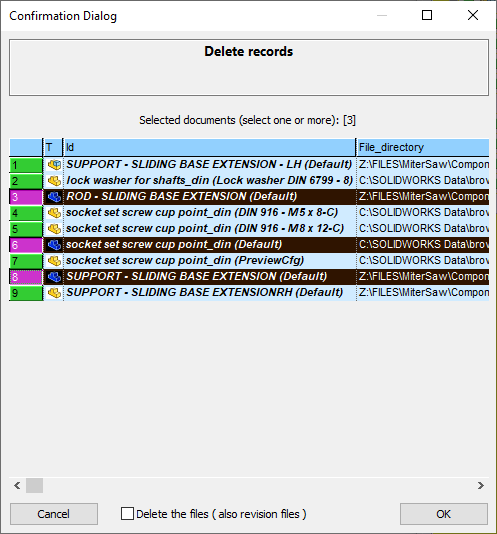
You need to select the records you want to delete, possibily all of them, and click to give the command.
By enabling the bottom checkbox you can choose to delete the selected documents files and all their previous versions.
The value of the checkbox is persistent across different MechWorks PDM sessions of the same user.
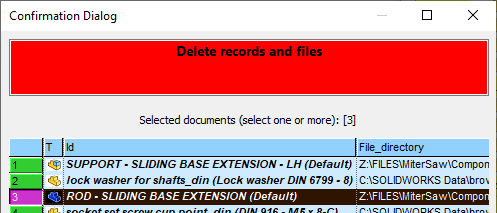
When the option is checked, a different message with a different color is displayed in the message window of the Confirmation Dialog:
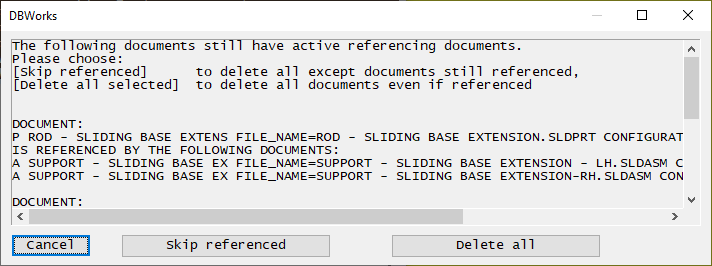
If the deletion of any record would imply a loss of reference, a dialog will show it.
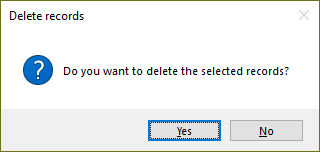
A last confirmation dialog appears before finalizing the command:
The script OnDeleteRecord.LST is associated to the deletion event and can be used to perform actions such as ERP update or e-mail notification.
When deleting projects, you could be not allowed to remove projects that have been created as SHARED projects through the option Project→ Always create shared projects