Each time you save an assembly, after modifying the fields values you are asked if you want MechworksPDM to save the information related to all its sub-assemblies and parts:
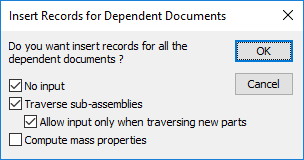
The available options are:
No input
|
If the option is disabled and you traverse the sub-assemblies, MechworksPDM retrieves from the CAD and from the system all possible data concerning the document and will display the input form of included sub-assemblies and parts. Take into consideration that if the assembly you are saving is complex, you may have to enter information for many sub-documents before actually terminating the save process. |
|---|---|
|
If the option is enabled and you traverse the sub-assemblies, MechworksPDM will retrieve from the CAD and from the system all possible data concerning the document but will not request/allow for input of included sub-assemblies and parts. |


Traverse sub-assemblies
|
If the option is disabled only the information related to the document itself is saved and you will not find any information about the sub-components if you never saved before or you may have incorrect parent child relations if you added or deleted a component and did not refresh the relations. |
|---|---|
|
If the option is enabled all the information related to sub-assemblies and parts belonging to this documents are saved into the database or refreshed where necessary. |
Take into consideration that as a tradeoff traversing all the sub-assemblies of a complex assembly can take quite some time.
To sum up, you must check it each time you modify the topological structure of the assembly, adding or deleting a component and on the first save; in any other case traversing sub-assemblies does not bring about any change, though we suggest as a good habit to let it enabled unless the assembly is not too complex in order to avoid the risk of any possible inconsistency.
If MechworksPDM is in transparent mode, the dialog is not displayed and by default saving an assembly implies traversing all its sub-assemblies.
Compute mass properties
|
If the option is disabled MechworksPDM will not calculate the mass properties of all included sub-assemblies and parts. |
|---|---|
|
If the option is enabled MechworksPDM will calculate the mass properties of all included sub-assemblies and parts. This operation applied to all components can keep the CAD busy for a long time. |