MechworksPDM and the file properties
MechworksPDM while saving stores all the main document information into the physical file of the document.
The tight integration of MechworksPDM with the file properties sheet is very important as it allows important direct and indirect advantages to the user. Some advantages are shown below while others (i.e. the possibility to display MechworksPDM fields into the SolidWorks automatically created BOM) are documented in the following sections.
To view the properties of a file:
•in SolidWorks click File, Properties.
•in Inventor click File, iProperties.
The custom sheet of the dialog displays all the document's fields.
SolidWorks file properties vs Inventor File iProperties
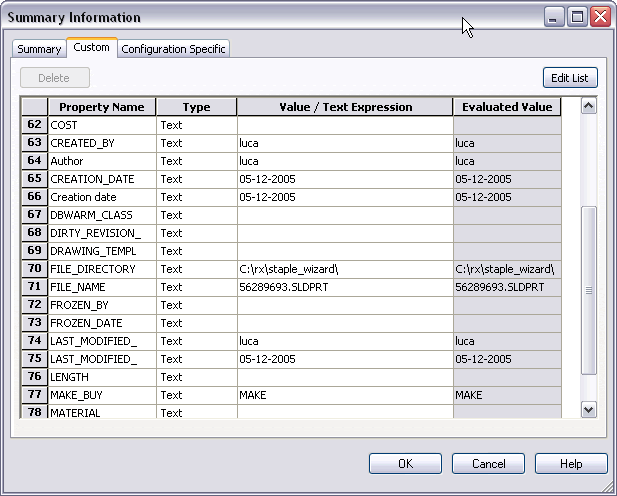
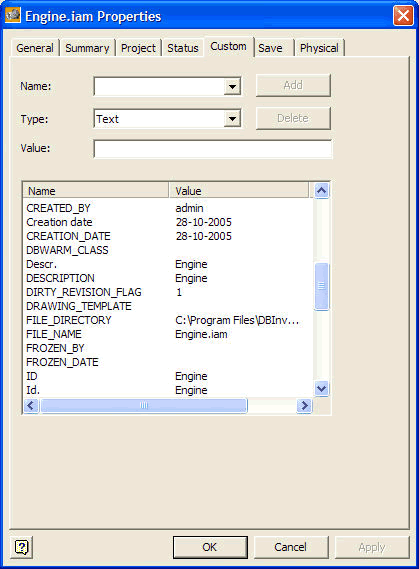
Both pages of the property dialog have been filled in with the information you entered in Edit View
If you want to manage configurations in DBWorks, you need to set the flag in the option dialog. For more information read Configurations and revisions.
This feature will allow you to quickly glimpse at the information related to a file without opening the CAD or MechworksPDM. You can also open this dialog window by selecting a CAD file from any Explorer window and right-clicking on properties/iProperties.
If you edit a MechworksPDM document the changes will not be effective on the file properties dialog until you save the CAD document. The displayed information is stored permanently and automatically with the document file.
Handling configurations
In particular this is true also for configurations: if you handle configurations as separate records and you modify the record of a configuration in order to refresh the configuration specific file properties you need to open the part in that precise configuration and then save it. If a part is saved in one configuration the file properties related to other configurations will not be automatically refreshed, so in order to refresh all configurations for a given document you need to open the document, switch to all the available configurations one by one and save each time the document.
Update of custom properties when editing a record of a closed CAD document
MechworksPDM can update the custom properties of the CAD file whose record is being edited also if the document is not currently opened in the CAD desktop.
Let's see an example and the issues that this feature raises:
Suppose you have a drawing D1 that contains the assembly A1, composed of the parts P1, P2 and P3.
Suppose you insert the BOM in the drawing:
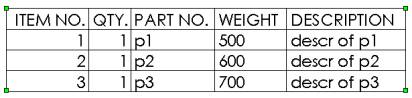
Go now in DBWorks, select the record of P1 and edit it: change the weight from 500 to 498:

Open now the drawing D1: the BOM is automatically updated as follows:
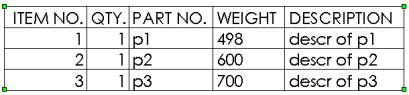
This has happened without opening and saving the file P1.SLDPRT.
This means also that if you do the same operation from within the DBWorks Standalone, the drawings will be updated at the next opening.
To avoid to modify database data for released records, it is suggested to activate the Options->Revisions:
[X] Avoid database record editing if released
Importing custom properties from existing files
It is possible to retrieve information previously stored in SolidWorks files and store it in given fields. This requires that a mapping between the existing custom properties and the field in the database should defined as a separate text file. For more information, please refer to the options for data input.