DBWForm programming environment
Please note this topic is deprecated; use .NET custom controls programming instead
MechworksPDM contains a complete graphical programming environment very much like the one you find in Microsoft Office 2000 applications as VBA. You can create your own custom form and call them as you would do with scripts with the clear advantage of offering an interface to the user.
Two new tools are available for editing and viewing/running forms for MechworksPDM:
•DBWFrmEd.exe the editor
•DBWFrmVw.exe the viewer
The file extension .DBWFRM identifies the forms created with the new environment. These files of type are now listed in the MechworksPDM, Utilities menu and in every contextual popup menu. You can also have files of type .DBWFRM associated with a database fields in the standard MechworksPDM Data Input Form, in a way similar to the .LST files.
The editor
This development environment is very similar to the VBA development environment and any Visual Basic programmer will be very familiar with this.
The objects available in the right side tool palette can be dragged onto the active document and for every component you dragged you can associate events procedure that define the interaction. The form can contain any ActiveX and OLE object, including any component you can purchase for specific advanced editing.
You can also write code to get/set data in the MechworksPDM database or command MechworksPDM through the exposed programmig interface documented elsewhere.
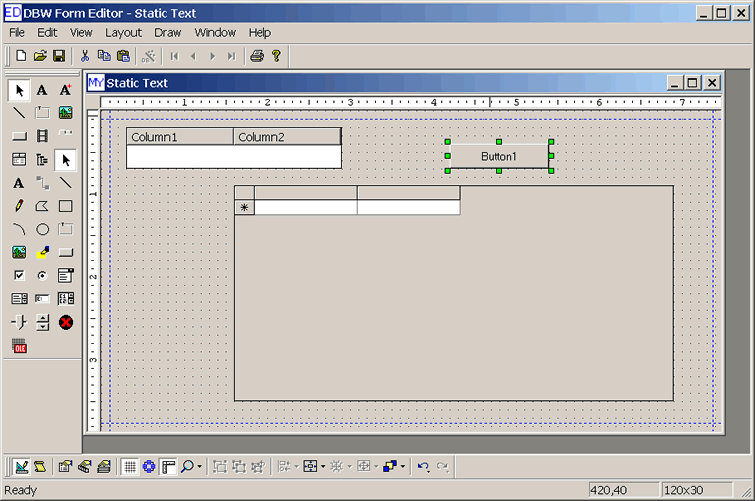
The visual editor
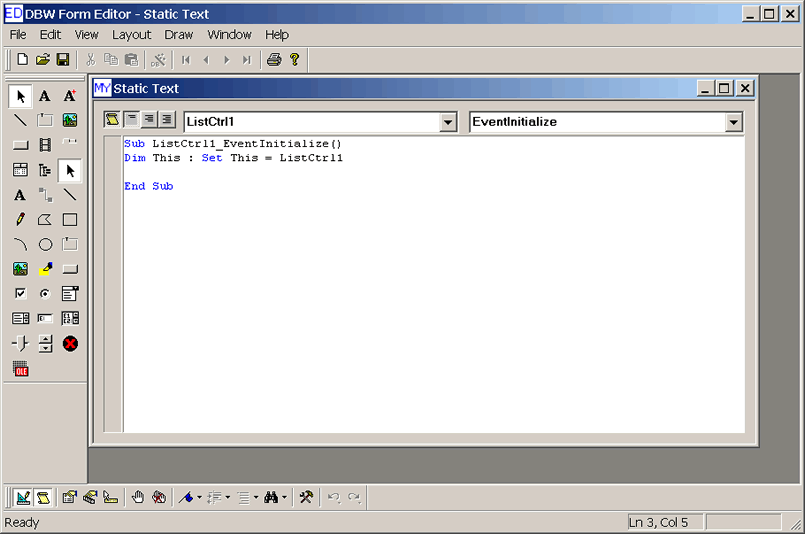
The code editor
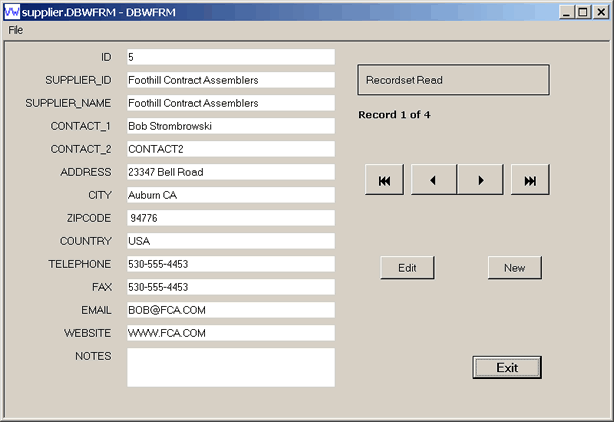
The running form: calling a form from MechworksPDM to edit a field value
The form is saved as a file, ready to be called from within the MechworksPDM User Interface.
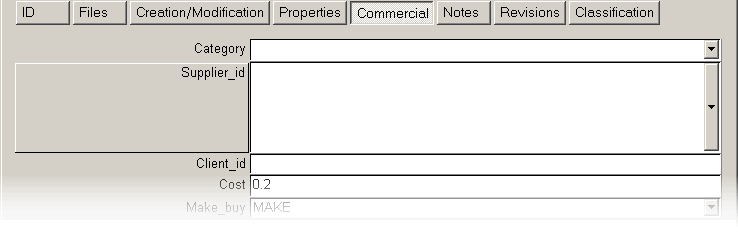
The normal way to use a .DBWFRM is to associate it to a database field using a .SPT files on that field. In this case a form is associated to the Supplier_id field in the tab Commercial. The field name appears not as a label but rather as a button, that if pushed, displays the form on screen to select the field value.
In this case the form displays extended information on the suppliers and allows you to select the current record before returning the control to the MechworksPDM dialog:
How to associate a form to a field
Suppose you want to create a special form for the data entry of the field ITEM_CODE of the database.
1.Create the form using the form editor DBWFrmEd.
2.Using Notepad, create a LST\ITEM_CODE.SPT file containing the following line:
.FORM item_code.dbwfrm
From now on, when you edit the field the form is displayed.
The following is the form used to select a material:
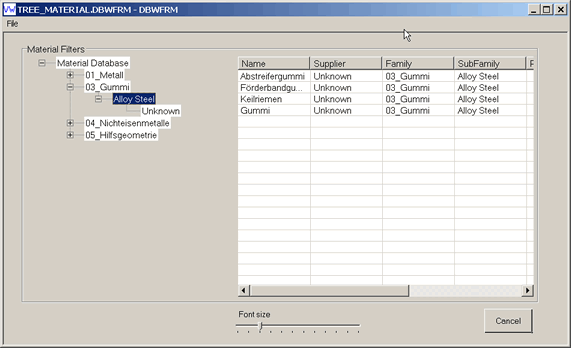
This form makes use of components included in the package to allow you to select the material for the part at save time. The source for the form is available as a .dbwfrm file and freely editable; it's a valild example of a custom editing interface.
Modal forms
Forms with the name beginning with "_" (underscore character) are run asynchronously out of process, while forms with the name not beginning with "_" (underscore character) run as a Modal Dialog, in process.
An example from Visual Basic
' declare the routines exported by ModalViewer.dll
Private Declare Function mvLoadFile Lib "ModalViewer.dll" (ByVal FileName As String) As Boolean
Private Declare Sub mvSetPosition Lib "ModalViewer.dll" (ByVal nLeft As Long, ByVal nTop As Long, _
ByVal nRight As Long, ByVal nBottom As Long)
Private Declare Function mvDoModal Lib "ModalViewer.dll" () As Long
Private Sub Command1_Click()
' left, top, right, bottom
mvSetPosition 100, 100, 1200, 750
' .dbwfrm file to use for modal
mvLoadFile ("e:\test\modalviewer\register_documents_in_dbworks.DBWFRM")
' call modal - return is TheView's Tag (if set)
lRet = mvDoModal
' display diagnostic
MsgBox "Modal Returned: " & lRet
End Sub
Important note concerning the library
The library file DECLARE.BAS, needed to the .DBWFRM scripts/forms, is created locally in the %ProgramFiles%\Common Files\MechWorks\DBWorks folder, instead of in the LST or LST\SYSTEM folder.
This allows the LST folder to be set as read-only, and also fixes problems when Standalone and Integrated systems are sharing the same LST folder.
In order to activate the creation on the local machine, any existing DECLARE.BAS in the LST or LST\SYSTEM folder must be removed, otherwise MechworksPDM will continue to use the existing ones.
Current behavior about declare.bas is like followings:
1.Declare.bas file is generated at every form run, as copy of the DBWSCRPT.LIB library file
2.If the form is invoked specifing an absolute path, then the declare.bas is created in the same absolute path
3.If the form is invoked specifing a relative path, then the declare.bas is created in the shared LST folder or sub path(e.g. LST\SYSTEM)
4.If the declare.bas is not existing in any of the previous location, then it is created in the %commonprogramfiles(x86)%\Mechworks\ folder