Introduction
There are three main forms managed by MwDPM products as main interface of database data: data form, revision form and linked table form.
Currently, at form level, it is possible to customize tabs and fields through the involved definition file (SCHEMA\DataEntr2.txt, SCHEMA\RevDEntr2.txt and SCHEMA\LKDT_DATAENTR_<table name>.TXT respectively).
The .NET CustomControl feature adds a new way to customize tabs and fields definition: based on .NET user control, new tabs can be designed with a powerful interface (using button, checkbox, combobox, picturebox, ...) to manage database data in the existing area.
The CustomControl feature is based on .NET technology and a new implementation module (.dll) must be programmed (a VB.NET example is available in LST_DIR\DotNETAPI\MwPDMDataInputControl folder) to provide Windows Forms User Control classes.
.NET CustomControl definition
New CustomControl feature definition is aligned with existing tab customization: in the .txt file definition, the following syntax is mandatory:
<TAB_NAME>
<IMPLEMENTATION_MODULE>
<IMPLEMENTATION_CLASS>
where the <IMPLEMENTATION_MODULE> must have the ".dll" extension and should be placed in the LST_DIR otherwise the full pathname must be provided and <IMPLEMENTATION_CLASS> is the name of the definition class (UserControl).
Input form
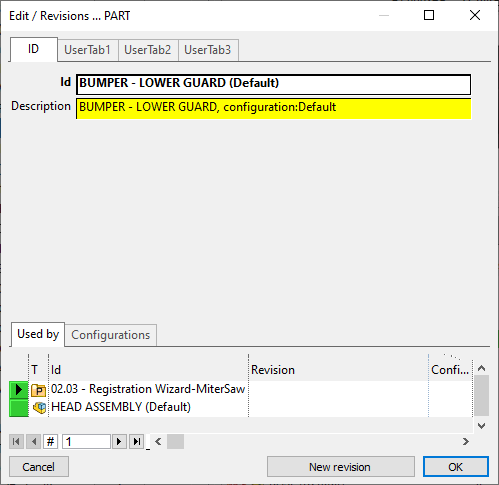
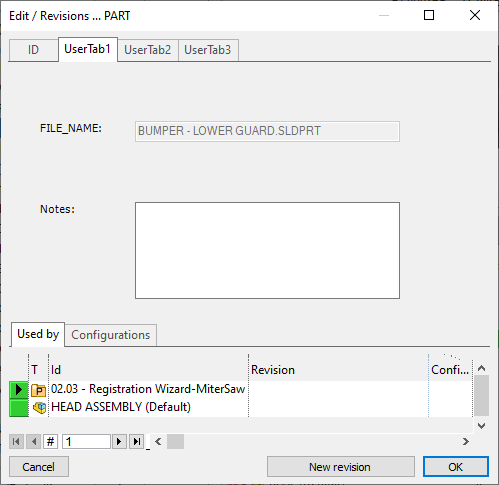
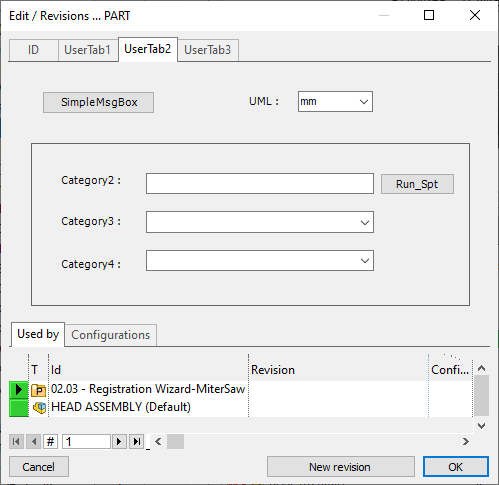
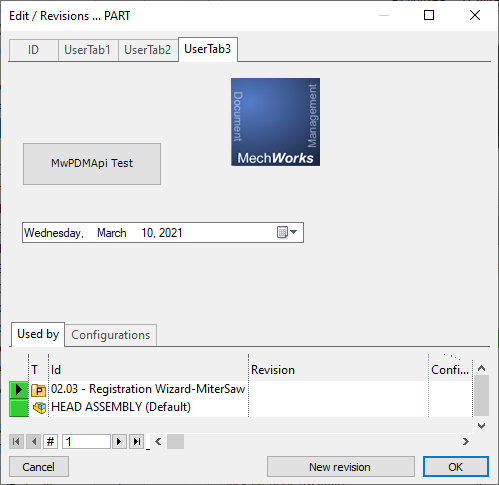
For example (with reference to SCHEMA\DataEntr2.txt):
...
ID
Id
Description
UserTab1
MwPDMDataInputControl.dll
UserControlTab1
UserTab2
MwPDMDataInputControl.dll
UserControlTab2
UserTab3
MwPDMDataInputControl.dll
UserControlTab3
...
At run time, when the involved dialog is shown, the <IMPLEMENTATION_MODULE> is loaded in process (MwPDMDataInputControl.dll) and the IMPLEMENTATION_CLASS code (UserControlTab1, UserControlTab2, UserControlTab3) is executed.
Revision form
In the same way you can place custom controls in REVISION data form; please note declared fields must be compliant to the REVISIONS table schema:
For example (with reference to SCHEMA\RevDentr2.txt) this code
...
ID
REVISION
CONFIGURATION_REVISION
DESCRIPTION
UserTab1
MwPDMDataInputControl.dll
UserControlTab1
UserTab2
MwPDMDataInputControl.dll
UserControlTab2
UserTab3
MwPDMDataInputControl.dll
UserControlTab3
...
produces followings dataforms:
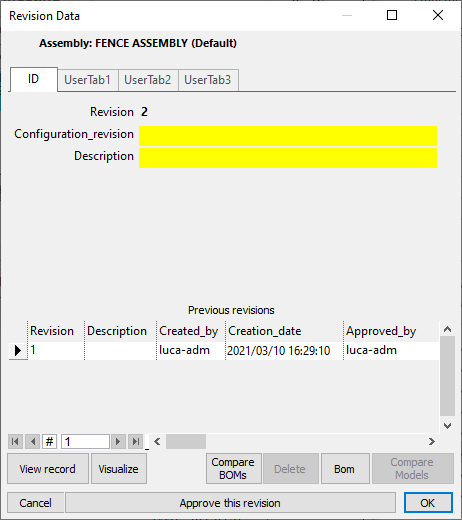
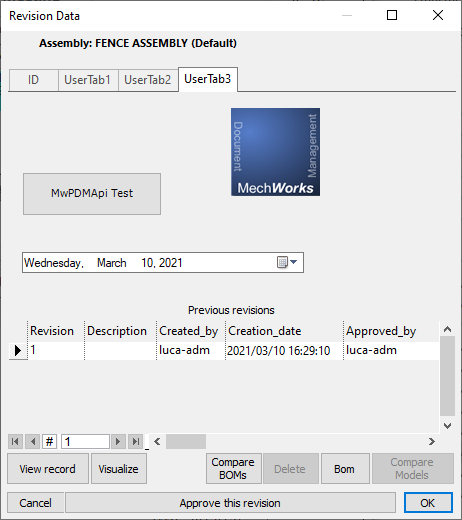
Customize Control: .NET approach
A Windows control is the standard approach to implement user interaction with an application: using controls it is possible to provide a variety of services and to customize the way to type text, choose options and perform actions. The .Net Framework supplies a pretty rich set of controls and allows to create own controls (all inherited from a common base class called UserControl). For additional information, refer to .Net System.Windows.Forms.UserControl documentation.
The new CustomControl feature is based on UserControl to design the new user interface layer: for each new tab (<TAB_NAME>) a specific class must be implemented (<IMPLEMENTATION_CLASS>) taking care of the synchronization between its own data and MwPDM data (and viceversa).
To manage the synchronization, at MwPDMApi level, the new contract interface ICustomControl is provided:
' Implements this interface to manage custom control with event notification
Public Interface ICustomControl
' UpdateData method is invoked to align control with grid field/value (MwPDM -> control and viceversa)
Sub UpdateData(ByVal pVal As Application, ByVal PDMToUserControl As Boolean)
' ValidateData method is invoked in Data Input PRE-Ok execution to implement related data check.
' The OK execution continues only if all registered controls return TRUE in their data validation.
' When a registered control returns FALSE, the validation and OK-execution are interrupted and
' the involved tab is shown
Function ValidateData(ByVal pVal As Application, ByRef outputMsg As String) As Boolean
' Commit method is invoked in Data Input Ok execution when all validations are ok
Sub Commit(ByVal pVal As Application)
' Cancel method is invoked when Cancel is pressed in the Data Input dialog
Sub Cancel(ByVal pVal As Application)
End Interface
.NET custom control and performance
Since the implemented approach is based on sharing updated info between internal in-memory data and each customized control, MechworksPDM have to perfomr several updates on the different TabControls.
For this reason, the suggested approach in writing controls is:
•avoid different modules implementing .Net User Control (to load few additional modules, in process);
•in case of several User Controls to implement (max 10), it is suggested to create only one UserControl with a tab control implementing the specific data input form (in particular it is suggested in case of a complete redesign of the current Data Input card).
Developing a .NET CustomControl tab with Visual Studio
Using Visual Studio, the steps are:
1.Project creation and build: to generate the <IMPLEMENTATION_MODULE>;
2.Class control definition and rebuild: to generate the <IMPLEMENTATION_CLASS>, inherited from UserControl;
3.Add reference in involved definition file (like SCHEMA\DataEntr2.txt): to load the CustomControl in MwPDM related form.
Step 1: Project creation and build
1.File → New Project: select Templates + Visual Basic + Class Library: name and location of the project must be specified (like MwPDMDataInputControl):
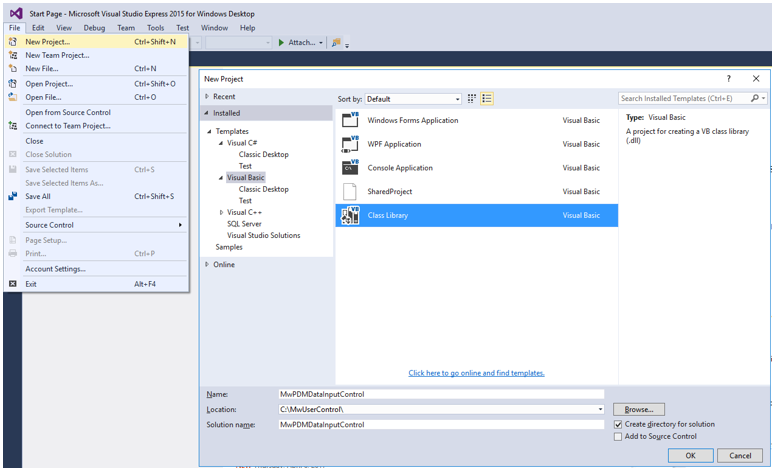
by default it generates an empty Class1.vb (not needed, it can be removed)
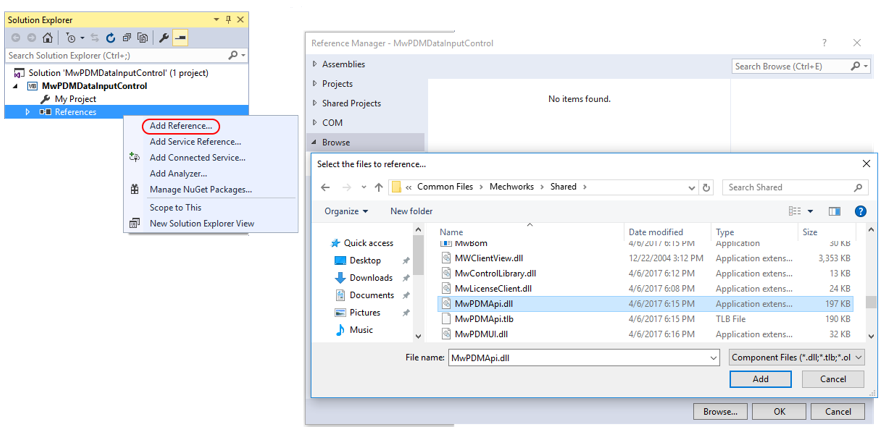
2.Add reference to MwPDMApi.dll:
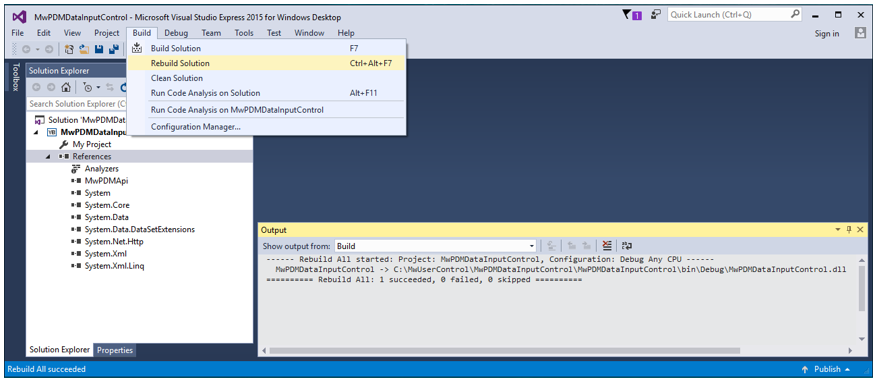
3.Build → Rebuild Solution:
Step 2: Class control definition and rebuild
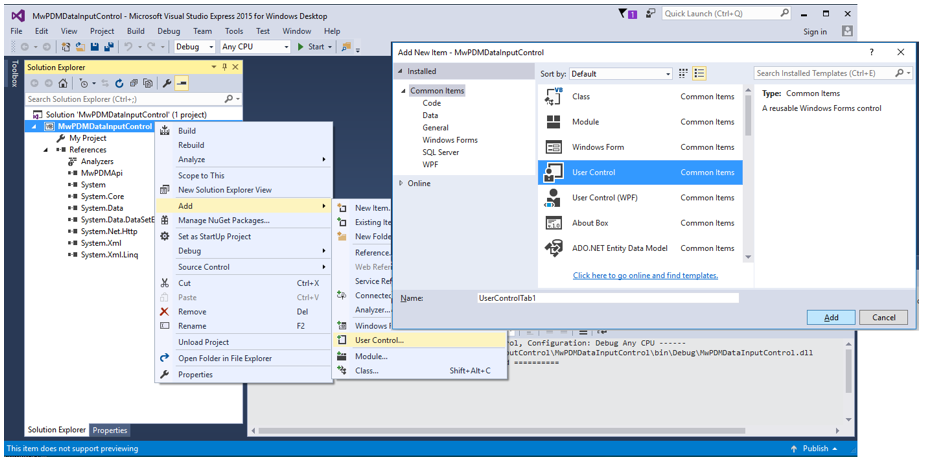
4.Select the solution: Add → User Control: class name must be specified (like UserControlTab1)
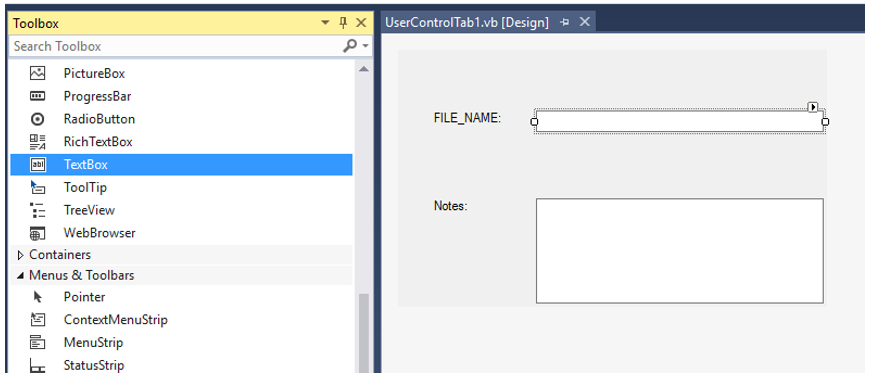
5.Using Toolbox, design the control according to user interface requirements
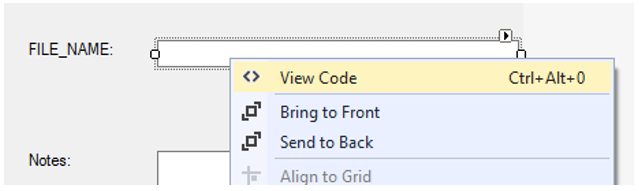
6.View Code: implement control specific code and add the instruction Implements MwPDMApi.ICustomControl to implement the synchronization code
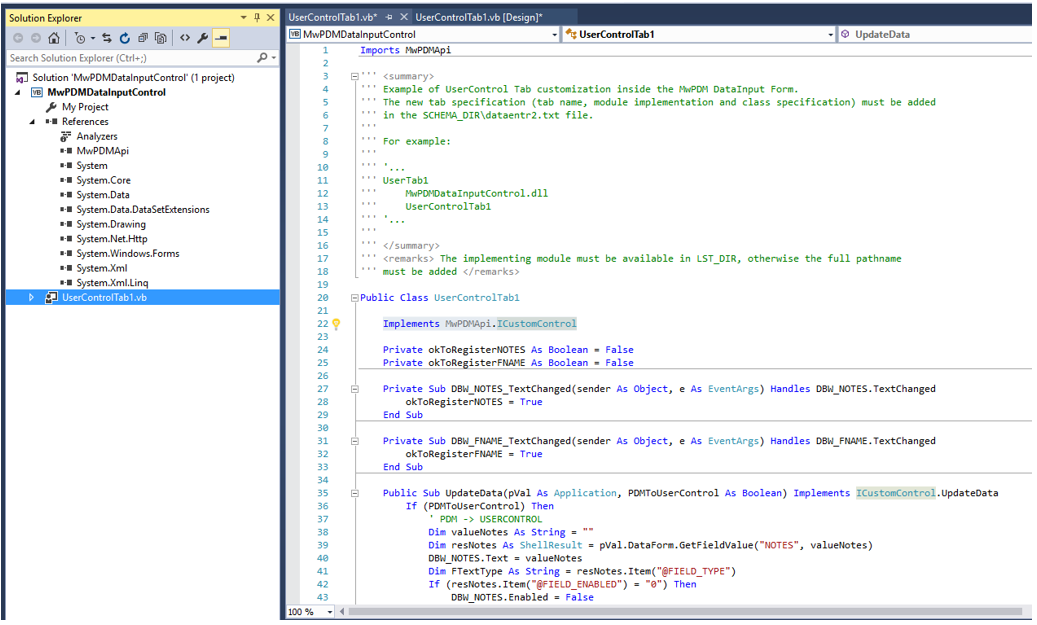
For details on UpdateData/ValidateData/Commit/Cancel implementation, see next chapter Implementing the ICustomControl interface.
7.Build → Rebuild Solution: to regenerate the .dll with the implementation code.
Step 3: Add reference in involved definition file:
8.In SCHEMA\DataEntr2.txt, add the following lines:
...
UserTab1
C:\MWUserControl\MwPDMDataInputControl\MwPDMDataInputControl\bin\Debug\MwPDMDataInputControl.dll
UserControlTab1
...
Implementing the ICustomControl interface
As explained before, the CustomControl must synchronize its own data with MwPDM grid data (and viceversa) through the implementation of the MWPDMApi.CustomControl interface.
Its specific methods are:
UpdateData
Sub UpdateData(ByVal pVal As Application, ByVal PDMToUserControl As Boolean)
where:
•pVal is a reference to Application object (to access the full MwPDMApi object model);
•PDMToUserControl is a Boolean indicating the kind of alignment. If true, the update occurs from PDM to CustomControl data otherwise from CustomControl to PDM data.
According to PDMToUserControl argument value, the implementation must be designed as follows:
From PDM to CustomControl (PDMToUserControl = TRUE): during initialization and/or switching context tab, the CustomControl must get PDM data values through DataForm.GetFieldValue method;
'...
If (PDMToUserControl) Then
' PDM -> USERCONTROL
Dim valueNotes As String = ""
Dim resNotes As ShellResult = pVal.DataForm.GetFieldValue("NOTES", valueNotes)
'...
From CustomControl to PDM (PDMToUserControl = FALSE): when data are changed at control level, the CustomControl must notify the new values to PDM through the DataForm.SetFieldValue method.
Private okToRegisterNOTES As Boolean = False
Private Sub DBW_NOTES_TextChanged(sender As Object, e As EventArgs) Handles DBW_NOTES.TextChanged
okToRegisterNOTES = True
End Sub
Public Sub UpdateData(pVal As Application, PDMToUserControl As Boolean) Implements ICustomControl.UpdateData
If (PDMToUserControl) Then
'...
Else
'USERCONTROL -> PDM
If okToRegisterNOTES Then
pVal.DataForm.SetFieldValue("NOTES", DBW_NOTES.Text)
End If
'...
End If
okToRegisterNOTES = False
End Sub
Here the okToRegisterNOTES is used to keep track of effective field value changes for performance issue and to prevent wrong notification (like notification of custom data initialized empty value).
It is suggested to manage an okToRegisterXXX data member for each MwPDM data field to be processed.
With reference to new methods available in the DataForm subsystem, here are some details:
Public Sub SetFieldValue(ByVal fieldName As String, ByVal fieldValue As String)
Set value of specific fieldName in the opened DataForm.
Public Function GetFieldValue(ByVal fieldName As String, ByRef fieldValue As String) As ShellResult
Retrieves value of specific fieldName in the opened DataForm. The output ShellResult object allows to get additional information:
@FIELD_TYPE |
type string value ("DE_SQL_INTEGER", "DE_SQL_REAL", "DE_SQL_DATE", "DE_SQL_CHAR", ...); |
|---|---|
@FIELD_CHOICELIST |
serialized string to manage values list (using ";" to separate rows, "vbTab" to separate multicolumn value for each row); |
@FIELD_KEYNAME |
in case of multicolumn values list, the key column position string or empty string otherwise; |
@FIELD_ENABLED |
1 if enabled field, 0 otherwise; |
@FIELD_READONLY |
1 if read-only field, 0 otherwise; |
@FIELD_NOTNULL |
1 if "NotNullField" field, 0 otherwise; |
@FIELD_NOTNULLONAPPROVE |
1 if "NotNullFieldOnRevisionApproval" field, 0 otherwise; |
@FIELD_DYNAMIC_QUERY |
1 if dynamic query field (.DYNAMIC), 0 otherwise. |
Public Function DataInputMode() As DataFormMode
Get mode of the opened DataForm (INSERT, VIEW, EDIT,...)
Public Sub DataInputInvokeScript(ByVal scriptName As String)
Execute data input related script (.spt/.lst)
ValidateData
Function ValidateData(pVal As Application, ByRef outmsg As String) as Boolean
where:
•pVal is a reference to Application object (to access the full MwPDMApi object model);
•outmsg (output parameter) is the message to be prompted (if not empty) by the Application when ValidateData returns FALSE.
As a first step of the DATA Input OK execution, the method must be used to implement data check (not null fields, ...): when the OK is pressed, the application requires data validation for each registered controls to go on with core validation and next commit executions.
If validation is ok, the method must return TRUE.
If validation is not ok, the method must return FALSE and, to provide more feedback, it may take care of changing the specific layout (BackColor,…) and setting accordingly the outmsg parameter.
When a registered control returns FALSE (i.e. no valid data) the OK execution is interrupted by the Application: the specific tab is selected and the outmsg is displayed (if not empty).
Commit
Sub Commit(pVal As Application)
where:
•pVal is a reference to Application object (to access the full MwPDMApi object model);
As final step of the DATA Input OK execution, the method is invoked when all validations are ok (registered controls and core) and after the core Commit execution (invoked at first to allow atomic changes at core level). In this way the UserControl is notified of the real OK execution.
Cancel
Sub Cancel(pVal As Application)
where:
•pVal is a reference to Application object (to access the full MwPDMApi object model);
The method is used to notify the Data Input Cancel execution at UserControl level.