MechWorks .NET API
API and Event script
The .NET API approach can be used as a new way to implement customization during program execution.
With respect of previous scripting, the execution is in process of the running Mechworks PDM: the lst implementation becomes a template and the implementation is moved in an in-process customizable .Net dll (MwPDMEvents). The new lst acts as a bridge to connect Mechworks PDM with customized event: when the event is fired, the customized code of the class with the same name in MWPDMEvents module is invoked.
As an example, according to the selected approaches, to customize the onOk event the steps are:
Scripting using DBWShell
1.Options→DataInput→ Use OnOk.LST sript when pressing OK must be activated
2.customize LST\OnOk.LST, for example
.VBSCRIPT
sub main()
DBWInit(TRUE)
fileName = DBWInput("FILE_NAME")
fileDir = DBWInput("FILE_DIRECTORY")
configuration = DBWInput("CONFIGURATION")
...
DBWOutput "@OKDATA", "1", ForWriting
DBWOutput "NOTES", "Changed from Scripting", ForAppending
end sub
Scripting using API
1.Options→DataInput→Use OnOk.LST sript when pressing OK must be activated
2.Depending on the release:
A.R23 and earlier releases implementation (based on vbs script engine) for LST\OnOk.LST (see code to interact with MwPDMApi):
'.x64
.VBSCRIPT
sub Main()
Set pDBWInit = CreateObject("MwPDMApi.Initialize")
Set pDBWAppl = pDBWInit.StartConnection(DBWorksApplicationName,DBWorksEventScriptType)
pDBWInit.EndConnection
end sub
B.R25 and newer implementation (MS announced vbs deprecation) for LST\OnOk.LST:
.MWNET
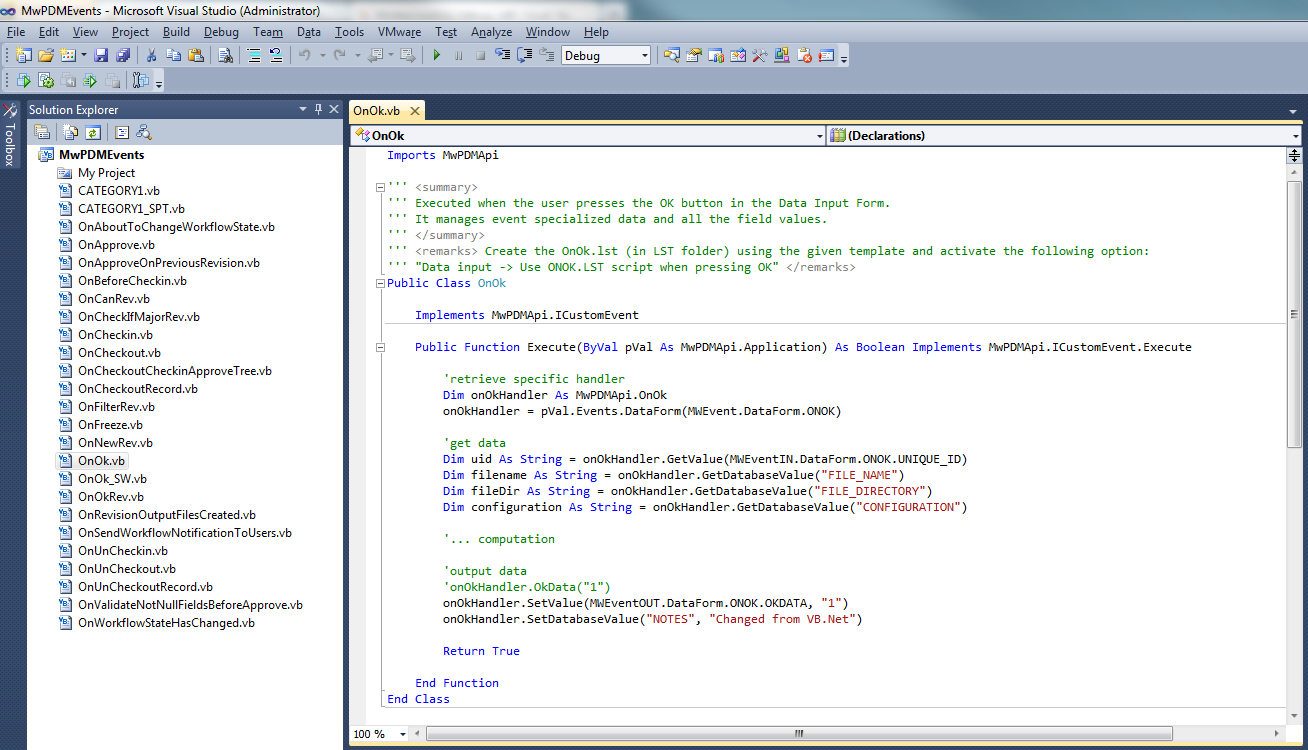
3.Implement the OnOk class in the MwPDMEvents assembly, for example:
FIELDNAME.LST or FIELDNAME.SPT scripts
The same approach is used to manage script FIELD events: when the field event is fired, the new lst/spt connects the Mechworks PDM with the MwPDMEvents module and the provided code of the class with same name (<Field>.vb, or <File>_SPT.vb to manage ".spt") is executed.
Custom event script
The set of event classes provided at MwPDMApi level is related to the On*.lst events (no additional events, i.e. the ones enlisted in Environment options page: Scripts list).
From MwPDM point of view, the mentioned custom scripts are a kind of script FIELD events: they are defined with a custom (or field) name and fired/executed by the application in particular circumstances.
With reference to existing MwPDMApi, it's possible to implement as for FIELDNAME.LST even if there are some conceptual differences in parameters management (OnFieldData.SetDatabaseValue/.GetDatabaseValue methods allow to manage "extended" data).
For example a typical customization of revision output driven by script could be as follows:
1.as usual, add the custom event name in C:\DBSOLIDEDGE_SERVER\schema\DBWRevisionsOutputFileExtensions.txt like:
SCRIPT Export2D
2.Depending on the release:
A.R23 and earlier release: implements the LST\Export2D.LST (renaming On_ScriptTemplate_.lst, to interact with MwPDMApi):
'.x64
.VBSCRIPT
sub Main()
Set pDBWInit = CreateObject("MwPDMApi.Initialize")
Set pDBWAppl = pDBWInit.StartConnection(DBWorksApplicationName,DBWorksEventScriptType)
pDBWInit.EndConnection
end sub
B.R25 and newer releases: (MS announced vbs deprecation) for LST\Export2D.LST:
.MWNET
3.Implement the Export2D class in the MwPDMEvents assembly, for example:
class Export2D : MwPDMApi.ICustomEvent
{
public bool Execute(MwPDMApi.Application pAppl)
{
MwPDMApi.OnFieldData handler = (MwPDMApi.OnFieldData)pAppl.Events().FieldData();
string checkValue = handler.GetDatabaseValue("@QUERY_OUTPUT_FILE_EXTENSION");
if (checkValue.Equals("1")) {
handler.SetDatabaseValue("@OUTPUT_FILE_EXTENSION", "PDF");
return true;
}
// ... computation
pAppl.UserInterface().MsgBox("Executing Export2d.cs ");
return true;
}
}
Implement Utility scripting using Event Scripting
To centralize all the code in a single dll, it's possible to implement Utility script through MWPDMEvents module. In the same way you run On_ScriptTemplate_.lst you can use _ScriptTemplate_.vbs that replaces the custom Utility script.
The core of Utility script has to be defined into MwPDMEvents module.
Example
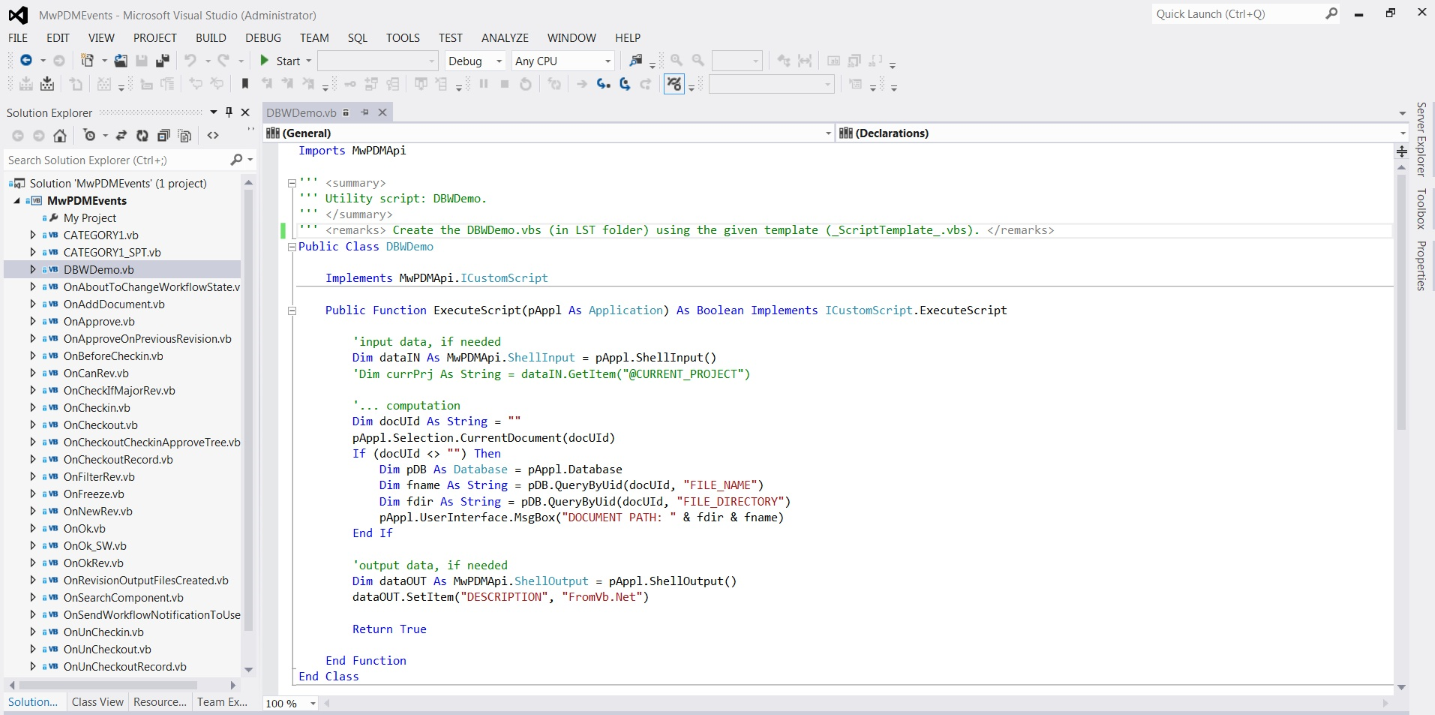
If you want to implement DBWDemo.vbs you've to:
1.Depending on the released:
A.R23 and earlier releases: rename
c:\MechWorks_Pdm_Server\lst\DotNETAPI\_ScriptTemplate_.vbs
to
c:\MechWorks_Pdm_Server\lst\DBWDemo.vbs
B.R25 and newer releases: (MS announced vbs deprecation) create an empty
c:\MechWorks_Pdm_Server\lst\DotNETAPI\DBWDemo.mwnet
2.implement class named DBWDemo inside the MwPDMEvents assembly.
Example by comparison
Event Script
Public Class OnOk
Implements MwPDMApi.ICustomEvent
Public Function Execute(ByVal pVal As MwPDMApi.Application) As Boolean Implements MwPDMApi.ICustomEvent.Execute
'retrieve specific handler
Dim onOkHandler As MwPDMApi.OnOk
onOkHandler = pVal.Events.DataForm(MWEvent.DataForm.ONOK)
'get data
Dim uid As String = onOkHandler.GetValue(MWEventIN.DataForm.ONOK.UNIQUE_ID)
Dim filename As String = onOkHandler.GetDatabaseValue("FILE_NAME")
Dim fileDir As String = onOkHandler.GetDatabaseValue("FILE_DIRECTORY")
Dim configuration As String = onOkHandler.GetDatabaseValue("CONFIGURATION")
'... computation
'output data
'onOkHandler.OkData("1")
onOkHandler.SetValue(MWEventOUT.DataForm.ONOK.OKDATA, "1")
onOkHandler.SetDatabaseValue("NOTES", "Changed from VB.Net")
Return True
End Function
End Class
Utility Script
Public Class MyUtility
Implements MwPDMApi.ICustomUtility
Public Function Execute(ByVal pVal As MwPDMApi.Application) As Boolean Implements MwPDMApi.ICustomUtility.Execute
'to get input value, if needed...
Dim pDBWIn As MwPDMApi.ShellInput = pVal.ShellInput
'get data
Dim filename As String = pDBWIn.GetItem("FILE_NAME")
'... computation
'to set output value, if needed...
Dim pDBWOut As MwPDMApi.ShellOutput = pVal.ShellOutput
pDBWOut.SetItem("NOTES", "Changed in script utility")
Return True
End Function
End Class