Variant notes including scripting commands
In MechworksPDM variant notes you have the possibility to include scripting code. MechworksPDM will execute the assigned script and will output in the drawing any text generated by the script.
How to generate specific code
The script must include a Sub Main that will be executed automatically. From inside the scripting you can have accede two basic parameters that allow you to identify both the drawing and the contained document.
Read more
The parameters are:
@DRAWING_UNIQUE_ID |
the unique id of the drawing; it is always a non-zero value |
|---|---|
@DOCUMENT_UNIQUE_ID |
the unique id of the document |
Using this two parameters the script can fetch any value from the MechworksPDM database and generate a text for the variant note using the function DBWOutput "TEXT",....
Let's now see a valid example of a scripting that requests the parameter values to perform calculations and output the values directly into a variant note. The script may be saved as /LST/VARNOTE.LST. It's content is:
.VBSCRIPT
Sub Main()
Set swApp = CreateObject("SldWorks.Application")
DBWinit(TRUE)
drawingUniqueId = DBWInput("@DRAWING_UNIQUE_ID")
documentUniqueId = DBWInput("@DOCUMENT_UNIQUE_ID")
'DBWMsgBox "Drawing uid=" & drawingUniqueId
'DBWMsgBox "Document uid=" & documentUniqueId
if documentUniqueId <> 0 then
docId = DBWQueryByUid( documentUniqueId, "ID" )
drwId = DBWQueryByUid( drawingUniqueId, "ID" )
docRevId = DBWQueryByUid( documentUniqueId, "REVISION" )
drwRevId = DBWQueryByUid( drawingUniqueId, "REVISION" )
DBWOutput "TEXT", "Drawing :" & drwId & " Rev." & drwRevId , ForWriting
DBWOutput "TEXT", "Document:" & docId & " Rev." & docRevId , ForAppending
end if
End Sub
The script basically reads the parameter values and uses the information to request the ID and the Revision both for the drawing and it's content; finally it generates some formatted output text for the variant note.
To link the variant note to the output generated by a script, specify the following content:
@DBW=.VBSCRIPT varnote.LST
where you may substitute varnote.LST with the name of any valid script in the /LST directory performing some output as in the example.
.VBSCRIPT is necessary to indicate that the following parameter is the name of an existing script that will be executed to fill the variant note.
When saving the drawing, the following note will be shown in the SolidWorks drawing:
Drawing : 567890 Rev.2 Document : P78917 Rev.5
If the font of the variant note is a FIXED size font, like the Lucida Console or similar, a tabular output can be generated.
DRAWING or DOCUMENT specific variant notes scripts
The scripts used for filling the MechworksPDM variant notes can be declared with a prefix DOCUMENT. or DRAWING. (localized if necessary) for being run only when the drawing is being processed or the document is being processed.
Read more
Any variant note script can understand in what phase it is in execution checking the value of the @DRAWING_UNIQUE_ID and @DOCUMENT_UNIQUE_ID inputs as follows:
DrwUid = DBWInput("@DRAWING_UNIQUE_ID")
DocUid = DBWInput("@DOCUMENT_UNIQUE_ID")
If DocUid = 0 then
< the drawing is processed >
Else
< the document is processed >
End if
Using this feature it is possible to avoid the execution of the script itself (with a performance enhancement in resolving the scripts) if it is known "a priori" that the script will onlymanage drawing-specific notes or document-specific notes.
Examples:
@DBW=.VBSCRIPT test.LST the script 'test' will run on both the phases
@DBW=.VBSCRIPT DRAWING.test.LST the script 'test' will run only when drawings are processed
@DBW=.VBSCRIPT DOCUMENT.test.LST the script 'test' will run only when documents are processed
Example
(use it with the above variant notes samples):
.VBSCRIPT
sub main()
DBWInit(TRUE)
DBWMsgBox "I am in execution ..."
DrwUid = DBWInput("@DRAWING_UNIQUE_ID")
DocUid = DBWInput("@DOCUMENT_UNIQUE_ID")
If DocUid = 0 then
DBWMsgBox "the drawing is processed"
fileName = DBWQueryByUid(DrwUid,"FILE_NAME")
Else
DBWMsgBox "the document is processed"
fileName = DBWQueryByUid(DocUid,"FILE_NAME")
End if
DBWOutput "TEXT", fileName, ForWriting
end sub
The script OnUpdateVariantNotes.LST
If present in the LST\ directory, it is invoked every time MechworksPDM needs to update the variant notes of a drawing. It's purpose is for implementing custom strategies for the updates of title blocks and/or other variant notes in a drawing template. Typically it will be used for optimizing the performance of the standard variant notes process.
For more information please refer to the scripting section or to the main index.
Variant notes including hyperlinks
Using a Variant Note .VBSCRIPT procedure, it is now possible to output, as text value, an HyperLink, by prefixing the output string with the prefix:
@HYPERLINK=
Example
Insert a Note in the drawing and assign the Variant Note expression as:
@DBW=.VBSCRIPT myMechWorksDotComHyperlinkScript.LST
Create the script LST\myMechWorksDotComHyperlinkScript.LST like:
'.x64
.VBSCRIPT
Sub main()
DBWInit(TRUE)
drawingUniqueId = DBWInput("@DRAWING_UNIQUE_ID")
documentUniqueId = DBWInput("@DOCUMENT_UNIQUE_ID")
' write the hyperlink only when processing the drawing itself
If documentUniqueId = 0 then
' then output the hyperlink
DBWOutput "TEXT", "@HYPERLINK=http://www.mechworks.com", ForWriting
End if
End Sub
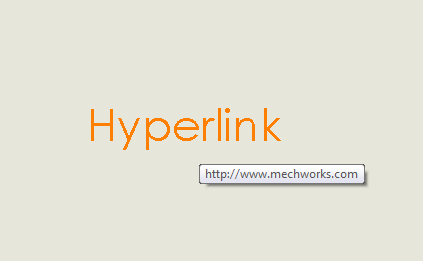
Once refreshed, the drawing will display the hyperlink added programmatically: