Released Database Mode Options
 Enable the Released Database Mode
If checked, MechworksPDM keeps a separate database for the users not belonging to the designing team, so that outside the team all the information displayed in DBWorks is related exclusively to approved versions.
Mechworks PDM looks for an ODBC data source named <MAIN_DBWORKS_DATASOURCE>_RELEASED, pointing to a database created exactly with the same structure of the original one, with the exception of the field UNIQUE_ID of the DOCUMENT table, that must be declared as NUMERIC (long integer).
Start MechworksPDM/DBSolidedge with Released Database
When checked, DBWorks will start it's database by using the <MAIN_DBWORKS_DATASOURCE>_RELEASED datasource or RELEASED_xxx tables.
it depends on the state of the related option "Released Database resides on RELEASED_... tables of main database"
We recommend that this option be enabled only by expert Administrators of DBWorks.
This option should be enabled only for specific DBWArm Groups.
Released Database resides on RELEASED_... tables of main database
When checked, DBWorks assumes that the Released Database primary tables (DOCUMENT, REVISIONS, PARENT_CHILD) are named RELEASED_DOCUMENT, RELEASED_REVISIONS and RELEASED_PARENT_CHILD and resides in the same main DBWorks database.
The prefix "RELEASED_" is fixed for all the database localizations; the rest is language dependent;
for example, for the Italian and German localizations, the name of the Released Database DOCUMENT table is:
RELEASED_DOCUMENTO (Italian)
RELEASED_DOKUMENT (German)
Use Released Database for restoring Document and Parent-Child data on Undo Checkin
When enabled, the Released Database data is used for restoring the DOCUMENT and PARENT_CHILD data of the unchecked-in document.
This means that also modifications like:
•change of quantities for real or fake components
•add/remove of Generic Documents
•editing of Database Fields in the DOCUMENT table
will be correctly restored to their last approved state.
Remarks
In order to have everything working as expected, every Child Document (included Generic Documents) must be approved before approving its Parent Document (so for example, it is suggested to enable the Revisions→Approval→ Avoid assembly approval if components are not released and Revisions→Approval→Avoid generic document parent approval if generic document children are not released).
If any Child Document is not approved, its related Parent-Child info will not be restored using this option.
So this functionality applies the exact state of the Released Database for the unchecked-in Document, and Child Documents in NEW, CHECKED-IN or CHECKED-OUT state will be removed from the Parent-Child Structure after the execution of the Undo Checkin functionality.
Copy released files on the Secured Storage Area
You can copy the files on a defined secured storage area at approval time indicating a UNC path as in "\\RELEASEDSERVER\E\".
A dialog helps you in selecting the path.
Released Database UNIQUE_ID is an IDENTITY type field
If enabled, the option keeps updated a full featured Released Database, with the UNIQUE_ID field declared as IDENTITY field.

MechworksPDM assumes that the target Released Database is a MechworksPDM working database, where people can work on it as in the standard database.
There are also some more assumptions for having this mechanism to work correctly:
1.The UNIQUE_ID IDENTITY range of the Released Database is different from that of the main database
2.The Project IDs must be different and unique
Please note that the points #1 and #2 are the same requirements of the Replication environment
In order to properly update the PARENT_CHILD records of the Released Database, DBWorks needs also the values of the Minimum and Maximum values of the Identity Range of the current main database
Example
Suppose that the main database ( Design Team ) has the UNIQUE_ID range ( 100000000,200000000 ).
For point #1, the Released Database must be set to a range like ( 200000000,300000000 )
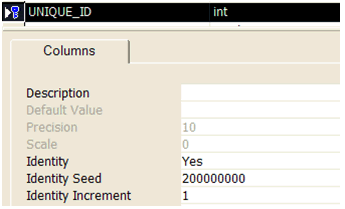
The options will be set as:
Identity range MIN value: 100000000
Identity range MAX value: 200000000