Server setup
The server in a standard configuration does not require to install any software.
It includes the parameter files that contain the options and all the script that define the final customized installation: it works merely as a parameters/script repository for all the clients.
These files are stored typically in a folder named Mechworks_PDM_Server and that's installed through the client setup (Client & Server, see below).
A specific setup for the server features is available to install server specific programs. Currently supported features are:
•DBWAclServer
•MWLicenseManager
The server installer is named MechWorks_Pdm_Server_Msi_R23_SP<sp>.EXE and it's available in the download area of the Mechworks website, together with the client installer.
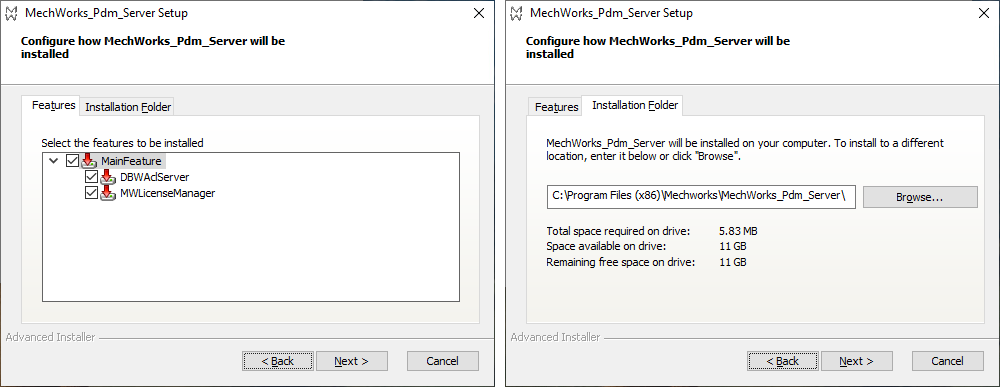
The main page of the wizard lets the user chose about what's to install (tab Features) and in which folder (tab Installation Folder):
DBWAclServer
Please note this server setup is not able to update the R17 version of DBWAclServer;
so if the service is already installed on the workstation and its name is DBWAclServer rather than MechWorks DBWAclServer (i.e. it's a service deployed with R17 or older) you first need to uninstall it through the MSDOS batch file DBWAclServer_Uninstall.bat (that's usually in <install>\bin\DBWAclServer\x86\ folder)
Before uninstalling the service, we suggest you to take note about
•Username to run the service as
•PDM Users Group name
so to properly set the new service.
When selected DBWAclServer, a logon info page is shown to ask the credentials of:
1.the user that will be used to run the service
2.the groupname used to group all the PDM involved designers.
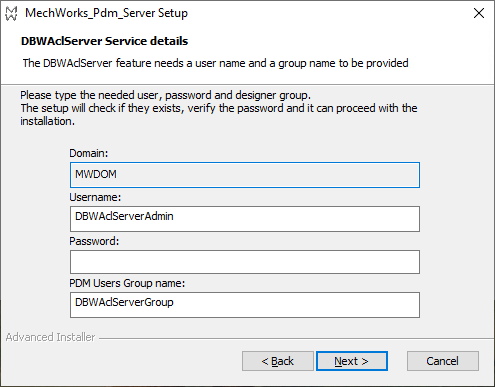
The setup expects those two identities to be already existing and it performs a check denying the completion if those checks reveal one of them not existing in the system (machine or domain).
Please note that, if the user or the group have to be created yet, we suggest names that reminds DBWAclServer (i.e. DBWAclServerAdmin or DBWAclServerGroup). The setup will grant needed privileges to the user in order to let running the service. For sure the user must be added into the Administrator group before starting the setup. Some minor checks are performed before starting the actual setup execution (i.e. password valid), raising an alert if there's been a problem.
After the installation process is completed, the two product services are installed and running, as this can be seen from the services list:

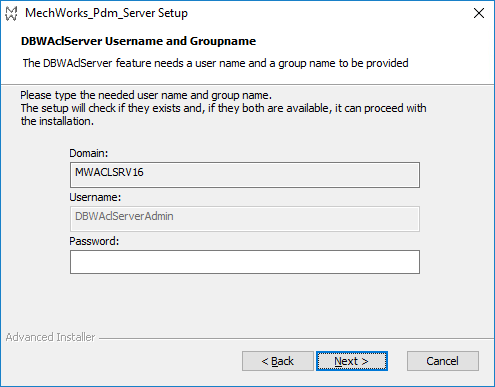
For an upgrade, i.e. a new service pack has been released, you can run the new setup on a server where a previous setup has been installed already: it will find out that the service and its username is already there so it won’t allow to specify another username and the groupnames (the textfields will be disabled), but it will only require the password:
MwLicenseManager
This option installs the service on the server; a further action by an administrator is required to run it (check the serial file, etc); please refer to the specific help topic for details.