Installing in silent mode (no prompt)
Here below are the specific MechworksPDM parameters
(further info about msiexec command are available at this Microsoft KB topic).
parameter |
description |
possible values case senstitive |
|---|---|---|
ADDLOCAL |
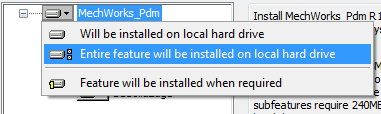
the equivalent of:
|
ALL |
REMOVE |
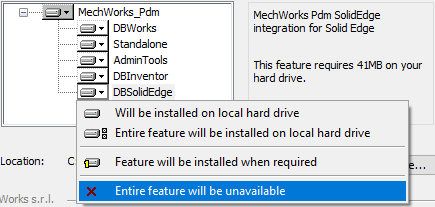
the equivalent of:
|
DBWorks |
GLOBAL_PARAMETERS_PATH |
the path where to look for DBWAPP.PAR |
|
INSTALLATION_TYPE |
lets you choose the type of installation |
Client |
DBW_LANG |
EN |
|
APPDIR |
the local path to install the application |
|
SOLIDWORKS_INSTALLED |
Yes |
|
SOLIDWORKS_VERSION |
2017 |
|
INVENTOR_INSTALLED |
Yes |
|
INVENTOR_VERSION |
2017 |
|
SOLIDEDGE_INSTALLED |
Yes |
|
SOLIDEDGE_VERSION |
219 |
Command line example
rem features REMOVE=Standalone
rem features REMOVE=DBInventor
rem features DBSolidEdge
rem features DBWorks
rem features REMOVE=AdminTools
rem parameters GLOBAL_PARAMETERS_PATH
rem parameters INSTALLATION_TYPE valid values are Client,Individual,Server
rem parameters DBW_LANG valid values are EN,IT,FR,ES,DE
rem SOLIDWORKS_INSTALLED=Yes
rem SOLIDWORKS_VERSION=2020
rem parameters APPDIR
MechWorks_Pdm_Msi_R20_SP1_0.exe /qb /l*vx %temp%\installmsi.log ADDLOCAL=ALL REMOVE=DBSolidEdge,DBInventor GLOBAL_PARAMETERS_PATH=X:\Mechworks_PDM_Server INSTALLATION_TYPE=Client DBW_LANG="DE" APPDIR="%programfiles(x86)%\MechWorks\MechWorks_Pdm" SOLIDWORKS_INSTALLED=Yes SOLIDWORKS_VERSION=2020
Proprietary command line switches
/extract <path>
Extracts the MSI contained by the EXE to the specified location. If the path contains spaces you must enclose it in quotes:
Mypackage.exe /extract:"C:\My work"
This command will extract the Mypackage.msi file in the "My work" folder.
/? and /help
Both these commands will display a help dialog containing the command line options for the EXE setup.
/exenoui
Launches the EXE setup without UI.
/exebasicui
Launches the EXE setup with basic UI.
The UI level set using the above command line options will overwrite the default UI level specified when the package was built.
/listlangs
Lists the languages supported by the EXE setup.
/exelang <langId>
Launches the EXE setup using the specified language. This command line option will have effect only if the EXE setup was build with the language selection dialog
You can use both an UI level and /exelang command line options at the same time.
These commands affect only the language selection dialog and the dialogs in the prerequisite wizard. In order to also affect the MSI package please use the standard MSIEXEC command line parameters. Note that the MSI parameters must come after the boostrapper parameters.
Setup - Silent Install Cheat Sheet to manage integrations: AutoCad, Office etc ....
General rules
- syntax is PROPERTY=value with no spaces around = ·
- do not add a trailing backslash to directory values ·
- feature names are case-sensitive.
Installer version
MechWorks_Pdm_Msi_R26_SP0_1.exe (or later)
Mode 1 — First install / upgrade: SolidWorks integration + Standalone
REM set installerPath and logPath
set SETUP=\\Path\To\Your\MechWorks_Pdm_Msi_R26_SP0_1.exe
set LOGFILE=%temp%\installmsi.log
REM Add all features
set ADD=ALL
REM Remove all features except DBWorks, Standalone
set REMOVEFEAT=DBInventor,DBSolidEdge,AdminTools,DBWord,DBExcel,DBOutlook,DBDratfSight,DBBricsad,DBAutoCad
REM set GlobalParametersPath
set GPPATH=X:\MechWorks_Pdm_Server
REM set Installation Type: Individual, Client, Server
set INSTTYPE=Client
REM set language: EN, DE, IT, FR, ES
set LANG=EN
REM set MWPDM installation directory (avoid final backslash)
set INSTDIR=%programfiles(x86)%\MechWorks\MechWorks_Pdm
REM set SOLIDWORKS_INSTALLED value (mandatory to install the SolidWorks integration)
set SWINST=Yes
REM set SOLIDWORKS_VERSION value, e.g. 2025 (mandatory to install the SolidWorks integration)
set SWVER=2025
REM Run installation command (set following command in one line)
"%SETUP%" /qb /l*vx "%LOGFILE%" ADDLOCAL=%ADD% REMOVE=%REMOVEFEAT%
GLOBAL_PARAMETERS_PATH=%GPPATH%
INSTALLATION_TYPE=%INSTTYPE% DBW_LANG="%LANG%"
APPDIR="%INSTDIR%"
SOLIDWORKS_INSTALLED=%SWINST% SOLIDWORKS_VERSION=%SWVER%
Mode 2 — First install / upgrade: Standalone only
REM set installerPath and logPath
set SETUP=\\Path\To\Your\MechWorks_Pdm_Msi_R26_SP0_1.exe
set LOGFILE=%temp%\installmsi.log
REM Add all features
set ADD=ALL
REM Remove all features except Standalone
set REMOVEFEAT=DBWorks,DBInventor,DBSolidEdge,AdminTools,DBWord,DBExcel,DBOutlook,DBDratfSight,DBBricsad,DBAutoCad
REM set GlobalParametersPath
set GPPATH=X:\MechWorks_Pdm_Server
REM set Installation Type: Individual, Client, Server
set INSTTYPE=Client
REM set language: EN, DE, IT, FR, ES
set LANG=EN
REM set MWPDM installation directory (avoid final backslash)
set INSTDIR=%programfiles(x86)%\MechWorks\MechWorks_Pdm
REM Run installation command (set following command in one line)
"%SETUP%" /qb /l*vx "%LOGFILE%" ADDLOCAL=%ADD% REMOVE=%REMOVEFEAT%
GLOBAL_PARAMETERS_PATH=%GPPATH%
INSTALLATION_TYPE=%INSTTYPE%
DBW_LANG="%LANG%" APPDIR="%INSTDIR%"
Mode 3 — Add the new features gradually (maintenance mode)
After having installed/upgraded the Standalone using Mode 1 or Mode 2.
Run against the existing installation: only ADDLOCAL with the feature to add — no REMOVE, no other properties.
Everything already installed stays untouched
REM set installerPath and logPath
set SETUP=\\Path\To\Your\MechWorks_Pdm_Msi_R26_SP0_1.exe
set LOGFILE=%temp%\addfeature.log
Add AutoCAD (standard)
REM Add feature (parent DBAutoCad + sub-feature)
set ADD=DBAutoCad,DBAutoCad_Standard
REM Run installation command
"%SETUP%" /qb /l*vx "%LOGFILE%" ADDLOCAL=%ADD%
Add AutoCAD Mechanical
set ADD=DBAutoCad,DBAutoCad_Mechanical
"%SETUP%" /qb /l*vx "%LOGFILE%" ADDLOCAL=%ADD%
Add AutoCAD Electrical
set ADD=DBAutoCad,DBAutoCad_Electrical
"%SETUP%" /qb /l*vx "%LOGFILE%" ADDLOCAL=%ADD%
Add Word integration
set ADD=DBWord
"%SETUP%" /qb /l*vx "%LOGFILE%" ADDLOCAL=%ADD%
Add Excel integration
set ADD=DBExcel
"%SETUP%" /qb /l*vx "%LOGFILE%" ADDLOCAL=%ADD%
Add Outlook integration
set ADD=DBOutlook
"%SETUP%" /qb /l*vx "%LOGFILE%" ADDLOCAL=%ADD%
Add several at once
set ADD=DBAutoCad,DBAutoCad_Standard,DBWord,DBExcel,DBOutlook
"%SETUP%" /qb /l*vx "%LOGFILE%" ADDLOCAL=%ADD%
Remove a feature (same pattern, REMOVE instead of ADDLOCAL)
set REMOVEFEAT=DBAutoCad_Mechanical
"%SETUP%" /qb /l*vx "%LOGFILE%" REMOVE=%REMOVEFEAT%
Remove several at once
set REMOVEFEAT=DBAutoCad_Mechanical,DBAutoCad_Electrical,DBOutlook,DBWord
"%SETUP%" /qb /l*vx "%LOGFILE%" REMOVE=%REMOVEFEAT%
Mode 4 — First install / upgrade: Standalone + Word, Excel, Outlook integrations
Identical to Mode 2, but DBWord, DBExcel and DBOutlook are not in the REMOVE list, so they get installed together with the Standalone client.
So user can install immediately together with Standalone.
REM set installerPath and logPath
set SETUP=\\Path\To\Your\MechWorks_Pdm_Msi_R26_SP0_1.exe
set LOGFILE=%temp%\installmsi.log
REM Add all features
set ADD=ALL
REM Remove all features except Standalone, DBWord, DBExcel, DBOutlook
set REMOVEFEAT=DBWorks,DBInventor,DBSolidEdge,AdminTools,DBDratfSight,DBBricsad,DBAutoCad
REM set GlobalParametersPath
set GPPATH=X:\MechWorks_Pdm_Server
REM set Installation Type: Individual, Client, Server
set INSTTYPE=Client
REM set language: EN, DE, IT, FR, ES
set LANG=EN
REM set MWPDM installation directory (avoid final backslash)
set INSTDIR=%programfiles(x86)%\MechWorks\MechWorks_Pdm
REM Run installation command (set following command in one line)
"%SETUP%" /qb /l*vx "%LOGFILE%" ADDLOCAL=%ADD% REMOVE=%REMOVEFEAT%
GLOBAL_PARAMETERS_PATH=%GPPATH%
INSTALLATION_TYPE=%INSTTYPE%
DBW_LANG="%LANG%" APPDIR="%INSTDIR%"