Support for custom columns in the Tree Page
•User Interface → Tree → Show BOM Quantity in Tree Page
•User Interface → Tree →Show MAKE_BUYin Tree Page
•User Interface → Tree →Show REVISION in Tree Page
•User Interface → Tree →Show COMPANY_ID in Tree Page
•User Interface → Tree →Extra Columns to addin Tree Page
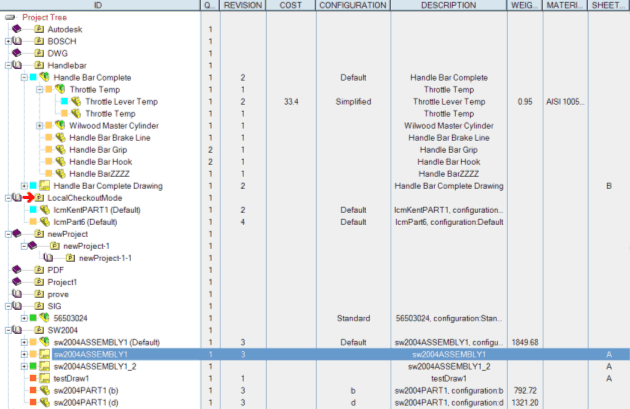
The options above enhance the appearance of the Tree Page. In particular, the Show... options permit to hide/show the default columns of the Tree Page (related data are anyway loaded for BOM and Buy List purposes).
Any extra field declared in the corresponding option is now shown in an extra column, on the right side of the default ones.
How extra columns affect other views: approval list and briefcase
The fields defined in the option Extra Columns to Show in the Tree Page affect also the Document Selector dialog, shown for multiple approvals of documents and for Briefcase put/get operations.