Dynamic Tree Columns
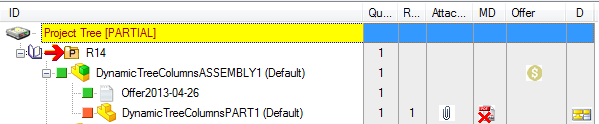
It is possible to show visual cues images also in a specific separate Tree Column.
The SCHEMA\IMG\DBWVisualCuesDef.txt syntax shows how to declare them:
;--------------------------------------------------------------
; DBWVisualCuesDef.txt
;
; DBWorks Visual Cues Definition File
;
;--------------------------------------------------------------
; "<field name>","<field value pattern>","<Image Definition>",<Img width>,<Position Code>,<Tree Img Offset>,<Grid Img Offset>[,<Tree Column Name>]
;
; <Image definition>::=
; a .BMP/.JPG/.TIF/.PCX/.TGA file name, or .
; @Line,<pen width>,R,G,B
; @Cross,<pen width>,R,G,B
; @Rectangle,<pen width>,R,G,B
; @Ellipse,<pen width>,R,G,B
;
; <Position Code> 0: full row; 1:icon; 2: text; 3: right-side full row;
; <Tree Column Name> if defined and not blank, it causes the Visual Cue to be displayed in a separate Tree Column with this assigned name
;
"@SQL1","(DBW_ATTACHMENTS)1=1","DBW_Attachment.ico",0,0,0,0,"Attachment"
;
"@SQL2","T='A' AND UNIQUE_ID IN ( SELECT UNIQUE_ID FROM DOCUMENT,PARENT_CHILD WHERE DOCUMENT.UNIQUE_ID=PARENT_CHILD.PARENT_UNIQUE_ID AND PARENT_CHILD.CHILD_UNIQUE_ID IN ( SELECT UNIQUE_ID FROM DOCUMENT WHERE T='G' AND ID LIKE 'Offer%' ) )","money.bmp",0,0,0,0,"Offer"
;
"@MASTER_DRAWING_FILE_STATUS","",".PDF.BMP",0,0,0,0,"MD"
;
When the optional <Tree Column Name> field is defined, all the <Img width>,<Position Code>,<Tree Img Offset> and <Grid Img Offset> fields can be set to 0
The <field name> field can now also have a special identifier: @MASTER_DRAWING_FILE_STATUS that will cause an image to be displayed when the Master Drawing File exists for the current document, of for the 1st level parent Drawing document. A red cross is displayed over the assigned bitmap ( in the above example ".PDF.BMP" ) when the Master Drawing file is older then the Drawing that has created it.
The following demo image shows a Tree where the above Visual Cues definition is applied, showing the new Tree Columns: