Extra Fields in the Tree
Web Client can display extra fields in the trees. This feature now supports fields coming both from the DOCUMENT table and from the PARENT_CHILD relation table.
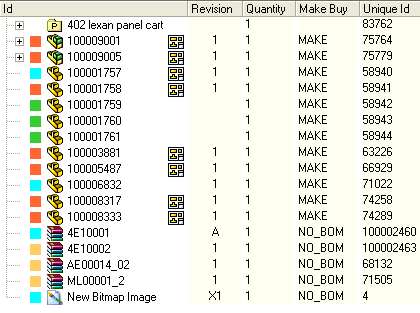
The choice of the field can depend on the user or group used to log in.
Assigning the fields
The fields are assigned in the parameter file on the Web Server located in ...\extraTreeFields.xml
The previous simple format is still supported, but the configuration can now contain richer metadata for each field.
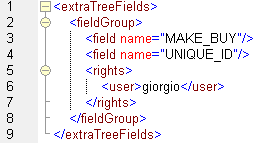
The tag fieldGroup includes a set of fields that you want to show in the tree.
Inside this tag you can define as many field tags as you need.
Before closing the fieldgroup tag include a rights tag to specify who's entitled to see the extra fields.
Inside this tag you can enter a list of users or groups using the tag user or group. Note that the user everybody makes the fields visible to every user.
Here's a simple example of a file that displays a set of fields to the designers and another to the commercials:
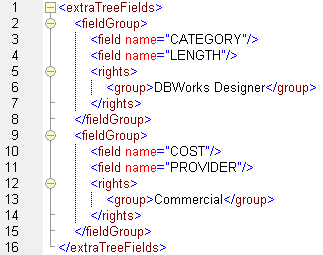
Note that in order to display information in the tree, which normally has little horizontal space it can be a good idea to display Visual Cues instead, especially for non fields with a preset list of values.
Extended field definition
Each field can now define:
oname: the client-side attribute name shown in the tree
osource: either document or parent_child
odbFieldName: the real database field to read
oaggregate: the aggregate to use for relation-based fields
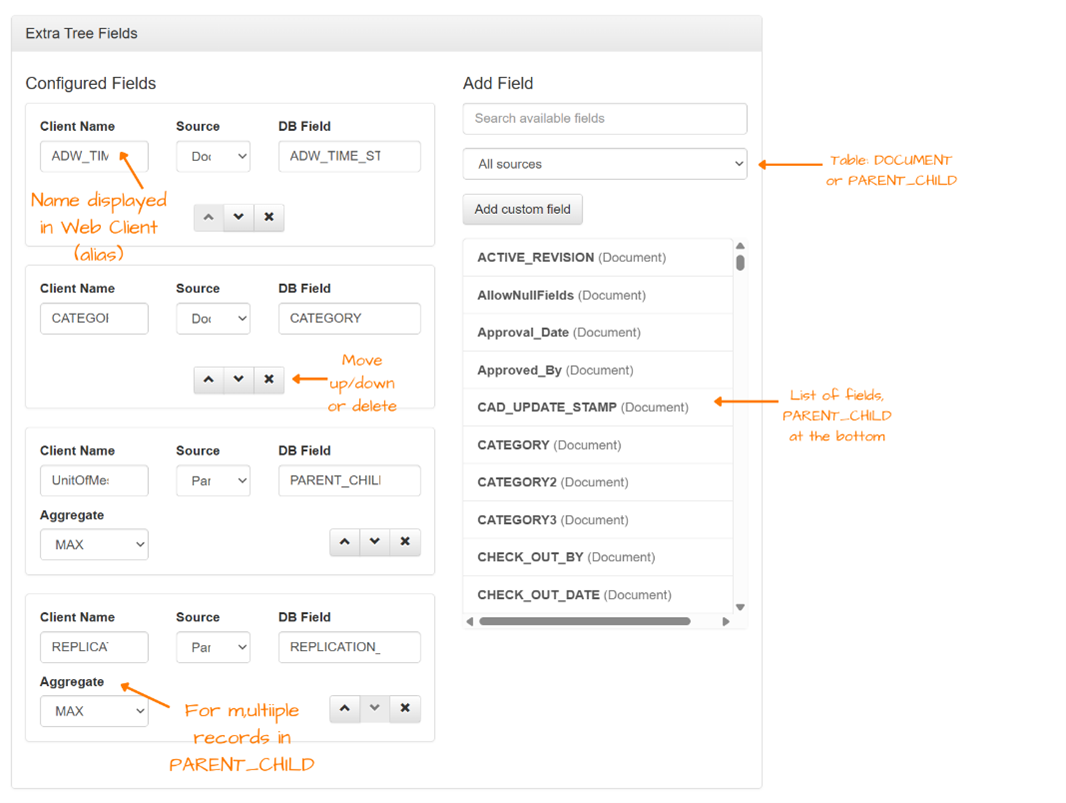
This allows exposing relation-specific values from PARENT_CHILD, assigning aliases to the fields displayed in the tree and keeping the client-visible name independent from the physical DB column name.
For fields coming from PARENT_CHILD, the supported aggregates are MAX, MIN, SUM and COUNT. If an aggregate is omitted for a parent_child field, the fallback is MAX.
<field name="RelUm" source="parent_child" dbFieldName="PARENT_CHILD_UM" aggregate="max" />
<field name="DocCheckOutBy" source="document" dbFieldName="CHECK_OUT_BY" />
The previous minimal syntax remains valid:
<field name="MyField" />
In that case the field is interpreted as a document field and the displayed name is also used as the DB field name.
Parameter management improvements
The options management UI has been extended so administrators can manage source selection, aliases, DB field names, aggregation for relation fields and field ordering more effectively than with the previous flat field picker.
The resulting values are still serialized as standard XML attributes in hierarchical nodes, so existing downstream consumers remain compatible.
