Local Checkout Mode
Compliancy with Local Checkout Mode
Web Client is compliant with local Check Out Mode, but only if the Tasks Client is running on the web server.
How it works
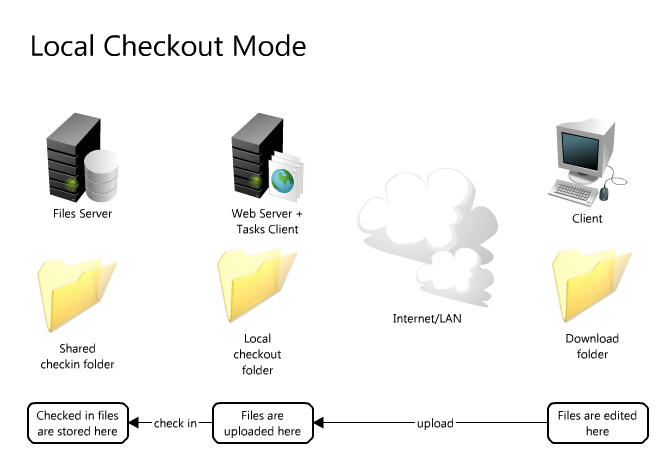
When you check out a file the file is first checked out on the local check out folder on the server, then downloaded to the client.
When you check in a file the file is first uploaded to the server in the local check out folder, then the check in is executed on the web server by the Tasks Client.
Prerequisites
The Tasks Client must be running on the web server.
Download and preview of documents
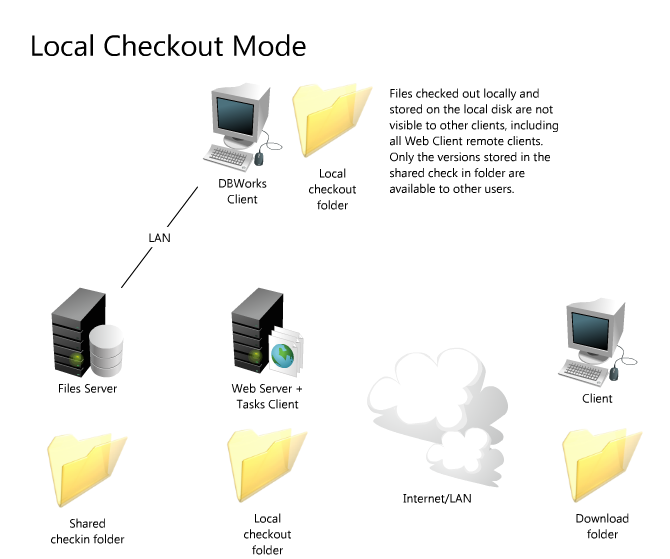
As per the Local Check Out Mode in the LAN environment, there are 3 folders: the database folder where the released version is stored, the shared check in folder and the local check out folder, that in this case is located on the web server.
When a document is downloaded the location from which the document is downloaded depends on your current rights and identity.
A document checked out by you is downloaded from the local check out folder on the web server to your local download folder.
A document checked out by somebody else is downloaded from the shared check-in folder, which means that as a different user you have access to the last checked in version of the document and not to the version currently being edited by the other user.