Full Text Search in Advanced Filter
Overview
Full Text Search in Advanced Filter allows MechworksPDM to find documents running queries in their textual content (as opposed to search in database fields). The search relies on the Windows Search engine on the files server and has these requirements:
•the files must reside on the server
•Windows Search on the server must be configured to scan the paths where the files reside
•Windows Search must be configured to scan the file types required
•For some specific file types (i.e. pdf) the installation of an add in of Windows Search may be requested on the server
Configuring Windows Search on the server
Look for Indexing options and specify the file types and the paths to be indexed in the dialog.
A simple guide is available here: http://www.tomsitpro.com/articles/windows-10-index-files-improve-search,2-54.html
An in-depth guide from Microsoft is available here: https://msdn.microsoft.com/en-us/library/windows/desktop/ee805985(v=vs.85).aspx
PDF files
If you can't enable full text search for pdf files on the server you may have to add a specific IFilter, which is an ad-in to Windows Search.M You can find it here: http://supportdownloads.adobe.com/detail.jsp?ftpID=5542
Setup on the file server
First configure the indexing options first and add the Ifilter for pdf files where needed. Install the service provided in the file TextSearchServiceSetup.msi The service installs in the directory C:\Program Files (x86)\DBWFullTextSearch Open the directory and add 2 text files:
Options.txt
The first line must be
connection_string
Followed by a TAB and a valid connection string to the DBWorks database The second line must be
UNIQUE_ID
Followed by a TAB and the localization of the field name in your language (for english it will still be UNIQUE_ID repeated)
DriveMappings.txt
Must contain the drive mappings used by DBWorks in order to locate the files. Suppose you have your local directory C:\Disk_Z mapped as Z: in DBWorks: then add the following line to the text file:
Z: C:\Disk_Z
Where the the entries are separated by a TAB If you have more mappings, add them in new lines using the same format as in the example above Save and close
Start the service and make sure that it starts automatically when the server is restarted
Activation on the clients
Open the base directory of the shared base location of the installation (the global parameters path). It could be something like M:\MechWorks_Pdm_Server where the drive M:\ is mapped consistently on every client. In this directory create the file FullTextSearchParameters.txt and inside add a line containing the IP addess of the server on port 8732 in the following format:
ip_address 192.168.0.207:8732
Save and close
The file types searchable by default
The standard files on which Full Text Search is enabled are: .doc, .docx, .xls, .xlsx, .xlsm, .txt, .pdf, .csv, .rtf
Changes in the Advanced Filter graphic interface to accomodate with the added querying options
Two entries have been added to the custom conditions: anywhere in database, anywhere in text content
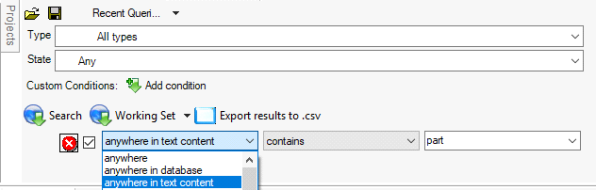
The specific type of query executed for the 3 entries:
•anywhere: search both in the text content of the files and the database
•anywhere in the database: the query applies only to the database content (slightly faster in execution)
•anywhere in text content: the query applies only to text content for the specific file types