Open/Save
 Resolve light weight components for writable assemblies
If checked, MechworksPDM automatically resolves all light-weight components while the assembly is editable, that is when the assembly is in NEW state or in CHECKED-OUT state
Update variant notes for writable drawings
this option is enabled only if the following one is checked:
General→Drawings→ Use DBWorks variant notes
If checked, DBWorks always updates the variant notes of writable drawings as it opens them. If this option is checked, the user doesn't need to refresh the drawing in order to see up to date information in the variant notes.
The option and Rapid Draft
If this option is checked each time the variant notes are used and are not up-to-date, DBWorks loads the ModelDoc. As a result Rapid Draft will not work as expected, so if you want to use RapidDraft you can disable this option and refresh the variant notes manually when needed. Note that when you refresh the variant notes manually the ModelDoc is always loaded before resolving the variant notes.
Update BOM for wrtieable drawings
If checked, MechworksPDM always updates the BOM Table of writeable drawings as it opens them.
Don't open documents on checkout
If checked, MechworksPDM doesn't open documents automatically after checking them out.
Don't open related documents on checkout
If checked, MechworksPDM will never ask for opening related documents (typically related drawings) when checking-out a document.
Choose configuration when opening a document
If checked, when opening a Solidworks document with more than one configuration, DBWorks displays a dialog to let you select the configuration (despite of the fact you clicked a specific configuration record).
The dialog displays a preview of the configurations at open time:
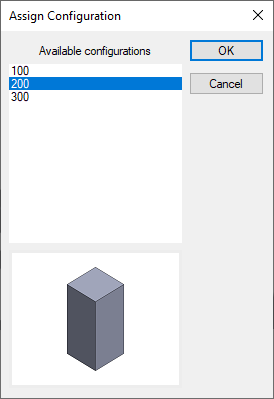
This option can be handy also when you manage different configurations in separate records because you may like to open a configuration that was not saved into the database or open a configuration that would take less to load, also if does not correspond to the current record.
The configuration is selected before opening the document.
if checked, DBInventor shows a dialog from which it is possible to select a standard representation to use for opening an Assembly, or to select the Defer Updates mode for opening a Drawing
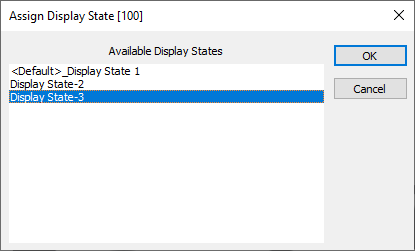
Choose Display State when opening a document
The option, available for DBWorks only allows the choice of the Display State through a dialog before opening a document:
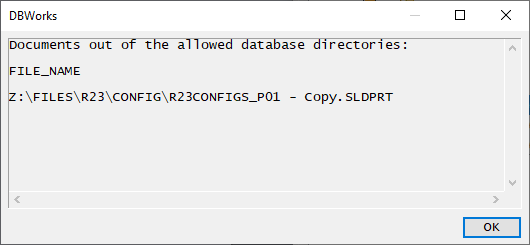
Show a warning if any no-database CAD document is opened
If checked, each time a document is opened from a directory that will be ignored by MechworksPDM (no record has been created for the document) a warning is displayed on screen.
Never open in Silent Mode
By default, the PDM opens the CAD documents in "silent mode", so suppressing opening progress dialogs, warnings, etc. that may be displayed by the CAD; by enabling this option the PDM avoids any "silent mode" when opening CAD documents
With the option unchecked, it is always possible to avoid the "silent mode" by keeping pressed the key while opening