Preview options
 Internal Full Preview
 External Full Preview
See specific topic here.
 Enable vectorial preview of ME10 files
Enables the preview for ME10 files. Read the topic ME10 files for more information.
Create temporary files in a different directory
By enabling this option and assigning the root folder (writeable), the temporary files, used for the preview of CAD files, will be created under the assigned root folder.
Please consider also the option Open/Save→Save→ Save preview image as file
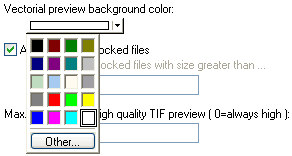
Vectorial preview background color:
You can set the background color for the preview to make sure the lines drawn are perfectly visible
 Always preview locked files
This option should be left checked. The option was introduced because in previous version of SW and in a Novell network environment it happened that files, once closed could not reset the read/write property correctly. The problem has been solved, but the option is still there only for the sake of safety.
[5000] Max. resolution for high quality TIF preview (0=always high)
If higher than 0 a faster with lower quality TIF rendering engine is used by DBWorks to display the TIF documents with a resolution higher than the assigned value.
The standards TIF rendering engine of DBWorks is an high quality printer level engine and it could cause long pauses (more than 15 seconds) when displaying very high resolution TIF documents (i.e. A0, A1 or A2 sheet formats higher than 300 dpi).
In such cases it may be preferable to have a faster preview response, but with a lower quality output.
The default value option is 5000, which corresponds to about an A2 size paper at 300 dpi.
The faster low-quality engine can reproduce correctly TIF files generated with LZW compression, which cannot be done by the high-quality engine. So, if you have all TIF files with this type of compression, set a very low value (such as 10) in the option in order to show all the TIF documents with the low-quality engine.