Rename a document
This option is not enabled if the document is opened in the 3D CAD.
In order to refresh the links correctly, all the parents must be in a writable state (i.e. checkout or new)
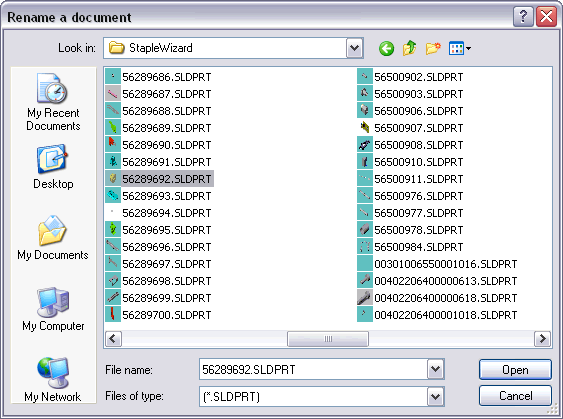
MechworksPDM allows you to rename a document and/or to move it to another directory or disk while keeping all the existing relations.
1.Right-click the document to be renamed
2.In the pop-up menu click Rename/Replace, Rename.
3.MechworksPDM displays a save dialog where you can indicate the directory path and the new name for the given document.
MechworksPDM moves and/or renames the document taking care of refreshing all the existing links. In plain words, if a part changes its name you still find it in every assembly where you expect it to be; more, all the previous revisions follow the document to the new directory and are renamed after it, so that the file systems as well maintains the same orderly structure.
We suggest to enable the following option to keep the SolidWorks feature manager updated according with rename/replace actions.
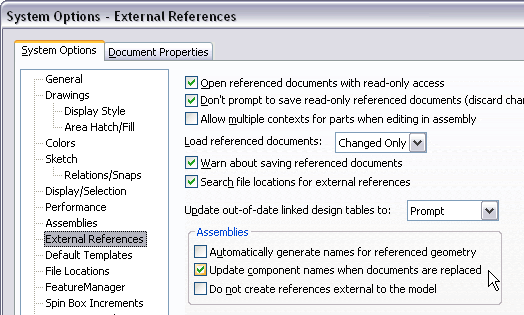
Rename and in-context parts
This command considers also the in-context created dependent parts, correctly updating the references in all the children documents that have a reference to the document being renamed.
Optionally remove the original file
Optionally you can remove the original file after creating a renamed copy. This option can be set in the Advanced section of the option dialog. Please read the related page in order to wheigh pros and cons of this option.
Reassign Project on Rename
After a successful Rename, DBWorks applies now the following options (if assigned):
Projects→ Save drawings on a separate project
Projects→ Save drawing on the Part/Assembly's project
Projects→ Assign project by component prefix or directory
DBWorks ignores any Project↔Document assignment made manually by the user.
Rename of configurations
The record ID is renamed only when it matches the default automatic ID that would be created by DBWorks without any script or manual change applied.
DBWorks, by default, creates the ID of the configured records in the format:
<base file name><space character>(<configuration name>)
The current implementation attempts to verify if the current record ID (before the rename) is matching the above format;
if so, DBWorks will rename the <base file name> part of the string.
Example
Suppose to have following configurations records:
FILE_NAME |
config |
Automatic ID created |
|---|---|---|
Part1.SLDPRT |
C1 |
Part1 (C1) |
Part1.SLDPRT |
C2 |
Part1 (C2) |
Part1.SLDPRT |
C3 |
Part1 (C3) |
Now, if you rename the Part1.SLDPRT as Part2.SLDPRT, DBWorks will accordingly rename the records IDs as:
FILE_NAME |
config |
Automatic ID created |
|---|---|---|
Part2.SLDPRT |
C1 |
Part2 (C1) |
Part2.SLDPRT |
C2 |
Part2 (C2) |
Part2.SLDPRT |
C3 |
Part2 (C3) |
If you alter the ID of the above records so that they will no more follow the automatic default rules for their assignment, DBWorks won't rename the IDs anymore, because it assumes that the records have been manullay modified (through scripting too).
Rename of attachments
When renaming a document, any attached file is renamed automatically if the document file name matches the attachment file name (e.g. MyFile.SLDDRW and MyFile.PDF)
