Bom of Balloons
 Solidworks users only
This functionality checks if all balloons in a SolidWorks drawing BOM are correct.
This functionality is considered obsolete since it is based on Solidworks BOM; the suggested BOM method is instead the Drawing BOM driven by the PDM
This functionality requires that:
1.the QueryPage is visible through the option User Interface→Browser Behavior→ Hide Query Page SQL Window
2.the BOMTITLE.TXT contains the followings statements:
BOMTEMP_XLS_ID "PART NUMBER"
BOMTEMP_XLS_POS "ITEM NO."
BOMTEMP_XLS_QTY "QTY"
Example
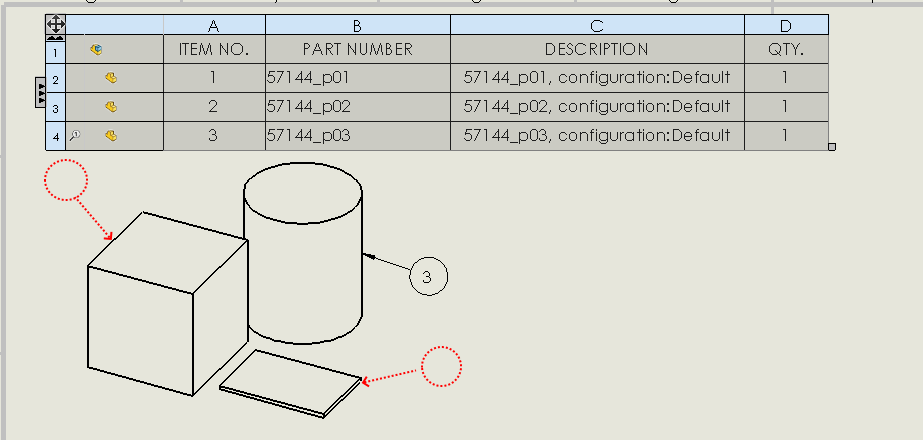
Suppose to have a drawing relative to an assembly composed by 3 parts.
Suppose that balloon number 1 and 2 are deleted and the drawing is saved with this lack.
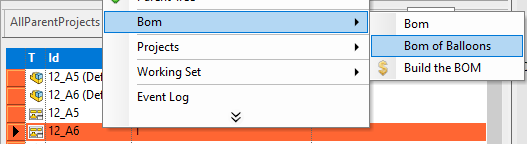
In MechworksPDM select the drawing in and click RMB → BOM → Bom of Balloons:
MechworksPDM opens the drawing and checks for the correctness of the balloons.
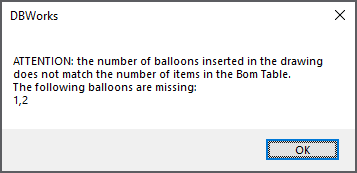
Since something is wrong, an alert box warns you that balloon 1 and 2 are missing: