Task Manager options
 Enable Task Manager
Enables/Disables the Task Manager functionality See specific help topic
Please note this option can be enabled only if the following option is disabled:
Environment→ Use full user name (only on Windows domains)
Force usage of integrated CAD for execution of tasks involving homogeneous documents, queued from standalone application
Generally when a task is enqueued for being executed, in the workstation that acts as executer the task will be performed by the same product type of the enqueuer.
By checking this option the executer starts the CAD application even if the submission was performed by a standalone.
option status |
task Submitter |
task Executer |
|---|---|---|
|
Standalone Client |
Standalone Client |
|
CAD application |
CAD application |
|
Standalone Client |
CAD application |
|
CAD application |
CAD application |

Example
Workstation1 (WS1) is the submitter, while Workstation2 (WS2) is the task executer. the user on WS1 schedules the release for a checkedin model and drawing through the standalone client. Since the user has turned ON the option, on WS2 the approval will be performed through the CAD and the drawing template will be properly updated. Otherwise if the option has been left disabled, the approval would have been performed as well on WS2 but data on the template would have resulted not up to date.
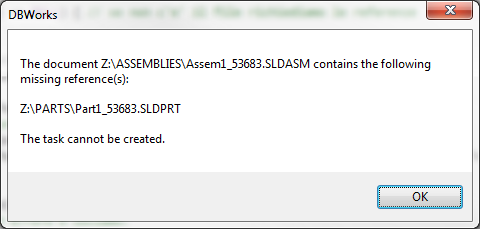
Check for missing reference before queuing tasks
This option perform a preliminar check in order to avoid to queue and execute tasks of checkin/approve that involve assemblies with missing parts
With this enabled, when queuing a new task, the Task Manager engine performs a search among the references of involved records of a task before queuing it, in order to search for missing ones.
If some is found, an alert message is shown and the task is no queued: