These functions allow you to do filtered searches in the MechworksPDM database. You can use wildcard to view only specific documents. You can also reset previously set filters.
 Filter mask
This button opens a dialog box that allows you to choose fields in which to search:
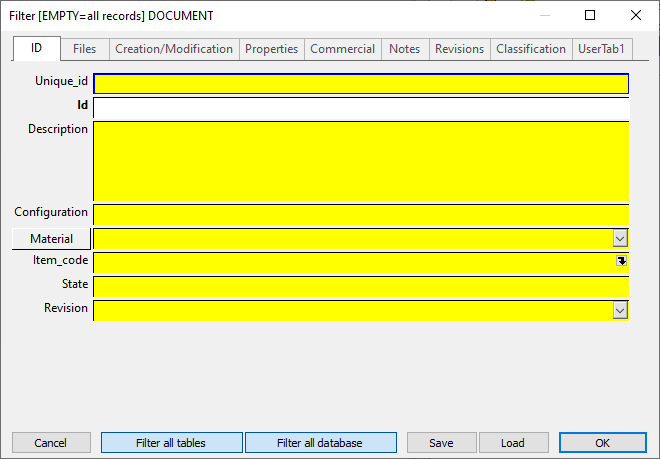
You can fill fields with normal values or with wildcard ones.
Example
Value |
Field |
Tab |
Result |
|---|---|---|---|
02% |
ID |
ID |
all documents that start with the first two character 02 |
02 |
ID |
ID |
all documents that start with the first two character 02 |
%clutch |
FILE_NAME |
Files |
all documents that contains somewhere the word clutch |
> 2010/02/22 |
CREATION_DATE |
Creation/Modification |
all documents created the in 2/22/2010 or after. |
> 2010/02/22 23:59:59 |
CREATION_DATE |
Creation/Modification |
all documents created the in 2/23/2010 or after. |
Specific indications for the underscore (_) character
Since the underscore character means 'every character' in the ODBC SQL grammar of the LIKE operator, used by MechworksPDM for filtering the tables, to have a list of the documents that contains the character '_' ( underscore ), a special sequence (escape sequence) of characters must be used.
For the MDB and SQL Server ODBC drivers this sequence is:
[_]
Open square bracket - underscore - close square bracket
This means that in the ID field of the filter data input mask, you must put the following string:
%[_]%
This will find all the documents that contains the underscore character in the ID.
Filter all tables
If this button is pressed the query is applied not only to the current grid, but to all visible grids in the Documents Page.
Filter all database
If this button is pressed the query applies to all documents in the database. This button overrules the filter based on the current project and looks for relevant documents also outside of it.
Please note the above buttons are disabled if the filter dialog is called from the TreePage; they're supposed to be used in the DocumentPage
Saving a Loading queries
Save
According with the set of the option
General→Path→ Load/Save .FIL files from the USERS/<user> folder
it saves the content of the filter form in a file of type *.FIL, under the <users> folder or under the sub-directory PAR.
When clicking for executing the just assigned Filter, and the Filter is still not saved, MechWorks PDM asks for saving it as a *.FIL file.
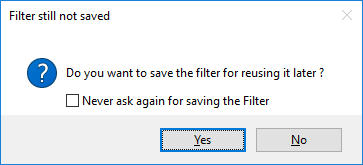
Load
According with the set of the option
General→Path→Load/Save .FIL files from the USERS/<user> folder
it loads the content of the filter form in a file of type *.FIL, from the <users> folder or from the sub-directory PAR.
Loads from a file of type *.FIL, under the sub-directory PAR, the content of the filter form
Shortcut for loading filters
Right-clicking on the Filter button of the Documents Page, a popup menu appears, containing the list of the files of type *.FIL existing in the PAR sub-directory. Selecting one of these, the filter file is loaded and applied.
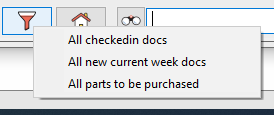
Note: when using the shortcut, the filter is always applied with the two options Filter all tables and Filter all database checked.
 Reset queries
This button resets all the filters; MechworksPDM restores the default queries and column sizes for all the grids.
To enable Autofill while creating a new filter, refer to the topic Autofill while setting a filter.