Understanding projects
In MechworksPDM a project is a general purpose container. Projects are displayed in the projects tree of the TreePage or the DocumentsPage.
A project can contain any type of documents, including CAD documents, text notes, PDF documents, Office documents, bitmaps or anything else that may help you in better describing the project you're working on and share the information with other team mates in a network environment.
SubProjects
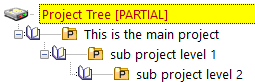
Projects can contain SubProjects that may help you in ranging the documents more orderly. You can create new SubProjects directly in the popup menu of this tree.
Current Project
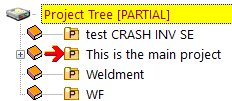
The current project is only one project a time and it's marked with a red arrow besid the icon.
Project↔User Assignment
You can customize the visibility/access to single projects depending on the user group. Here is the specific page for Project User Assignment tool.
Project's preview
In a project record you can declare an external image file that will be displayed as preview for that project.