Remarkable database fields
ITEM_CODE
The Item Code is typically associated with a commercial code or Part Number. You may decide to use the ID as the field containing the commercial code of the document, in which case this field becomes redundant. The Save/Open Wizard in its default setting stores the P/N information directly into the ID field, though you can modify its behaviour. Please refer to the topic Fields data input using DATAENTR.LST for further details.
CATEGORY
The field category is left for any flat categorization you may need to specify. Please note that this field is not related by default to any information obtained by the Save Wizard or categories as in the Category Maker though you may decide to create a link to the current category chosen at save time by modifying the related script. Please refer to the topic Fields data input using DATAENTR.LST for further details.
PARENT_CHILD fields
English field |
Localization |
TABLES |
type |
Nullable |
|---|---|---|---|---|
PARENT_CHILD_BOM_POS |
language independent |
PARENT_CHILD |
varchar(10) |
|
PARENT_CHILD_INDEX |
language independent |
PARENT_CHILD |
int |
|
PARENT_CHILD_RELATION_TYPE |
language independent |
PARENT_CHILD |
varchar(50) |
|
PARENT_CHILD_COMPONENT_REFERENCE |
language independent |
PARENT_CHILD |
varchar(50) |
|
PARENT_CHILD_INSTANCE_ID |
language independent |
PARENT_CHILD |
varchar(10) |
|
PARENT_CHILD_REFERENCE_STATUS |
language independent |
PARENT_CHILD |
int |
|

See EditBOM topic for details.
LAST_MODIFIED_FILE_DATE
English field |
Localization |
TABLES |
type |
Nullable |
|---|---|---|---|---|
LAST_MODIFIED_FILE_DATE |
language dependent |
DOCUMENT |
datetime |
|
The purpose of the field is to store in the database the last modified date of the file itself; the value is written as GMT +00 (the field LAST_MODIFIED_DATE stores the last modified date of the DATABASE record and is written as a Local Time Zone value).
When the Remote Access Mode is enabled, the out-of-date file highlighting in the Tree Controls use this field.
When the field value is not NULL, then it is considered for the process, else the related DOCUMENT::LAST_MODIFIED_DATE is used for backward database compatibility
The field must appear in all the places where the related LAST_MODIFIED_DATE appears, in particular:
•DOCUMENT table
•PART/ASSEMBLY/DRAWING/GENERIC views
•PART/ASSEMBLY/DRAWING/GENERIC/USED_BY/COMPOSED_OF/WORKING_SET/SEARCH definitions in the TABLES2.DFL
Remarks:
•In a replicated environment, the replicated databases must be updated as well
•In a RELEASED database environment, the RELEASED_ tables and views must be updated as well
LAST_CHECK_IN_BY and LAST_CHECK_IN_DATE
English field |
Localization |
TABLES |
type |
Nullable |
|---|---|---|---|---|
LAST_CHECK_IN_BY |
language dependent |
DOCUMENT,REVISIONS |
varchar(50) |
|
LAST_CHECK_IN_DATE |
language dependent |
DOCUMENT,REVISIONS |
datetime |
|
The purpose of these fields is to store in the database the last checkout→checkin user name and date - please note that the fields LAST_MODIFIED_DATE and LAST_MODIFIED_BY may be different from the LAST_CHECK_IN_BY and LAST_CHECK_IN_DATE in the case of a different user that approved the DATABASE record.
The two fields must appear in all the places where the related LAST_MODIFIED_BY/LAST_MODIFIED_DATE appear, in particular:
•DOCUMENT table
•PART/ASSEMBLY/DRAWING/GENERIC views
•PART/ASSEMBLY/DRAWING/GENERIC/USED_BY/COMPOSED_OF/WORKING_SET/SEARCH definitions in the TABLES2.DFL
Remarks:
•In a replicated environment, the replicated databases must be updated as well
•In a RELEASED database environment, the RELEASED_ tables and views must be updated as well
More, since the main purpose of such fields is to show their values in a Drawing's Revisions Table, the two fields must also be added to the REVISIONS table - the copy of the values from the DOCUMENT to the REVISIONS table is made internally by MechworksPDM, without the need to populate the list: Options→Revisions→Approval→Document fields to be copied in the MechworksPDM options.
Of course, in order to populate the Drawing's Revisions Table with the custom properties related to these new fields, the: Options→Revisions→Revision Fields to write as Properties list must be updated by adding the fields.
CAD_UPDATE_STAMP and DOCUMENT_CAD_UPDATE_STAMP
English field |
Localization |
TABLES |
type |
Nullable |
|---|---|---|---|---|
CAD_UPDATE_STAMP |
language dependent |
DOCUMENT |
int |
|
DOCUMENT_CAD_UPDATE_STAMP |
language dependent |
REVISIONS |
int |
|
The purpose of the fields above is to better manage the process of automatic uncheckout when no changes are applied to the checked-out models, specifically for supporting the option: Revisions→Approval→ Undo the checkout when no changes in the document on a recursive approve
When the above fields values are not NULL, then they are considered for the process, else the related DOCUMENT::UPDATE_STAMP and REVISIONS::DOCUMENT_UPDATE_STAMP are used for backward database compatibility
The fields must appear in all the places where the related UPDATE_STAMP and DOCUMENT_UPDATE_STAMP appear, in particular:
•DOCUMENT table
•REVISIONS table
•PART/ASSEMBLY/DRAWING views
•PART/ASSEMBLY/DRAWING/USED_BY/COMPOSED_OF/WORKING_SET/SEARCH/REVISIONS definitions in the TABLES2.DFL
Remarks:
•In a replicated environment, the replicated databases must be updated as well
•In a RELEASED database environment, the RELEASED_ tables and views must be updated as well
DBW_NO_LIFE_CYCLE
English field |
Localization |
TABLES |
type |
Nullable |
|---|---|---|---|---|
DBW_NO_LIFE_CYCLE |
language independent |
DOCUMENT |
bit |
|
The purpose of this field is to exclude specific documents from the PDM Life Cycle actions (Checkout/Checkin/New revision/etc.).
The intent is that specific user-written procedures (vbscript, .NET procedures, etc.) with user-specific logics, will set/reset this field when necessary.
The field must be declared among the fields of the Data Input Form, even if not editable.
When the field is set to "1", the PDM will no more expose any User Interface that would allow a Life Cycle process to be executed; the document exluded from the revision Life Cycle are marked with a red cross following icons:

See also options→Revisions→Manage revisions only for documents within the following directories
DBW_NO_WORKFLOW
English field |
Localization |
TABLES |
type |
Nullable |
|---|---|---|---|---|
DBW_NO_WORKFLOW |
language independent |
DOCUMENT |
bit |
|
The purpose of this field is to exclude specific documents from the WORKFLOW process.
The intent is that specific user-written procedures (vbscript, .NET procedures, etc.) with user-specific logics, will set/reset this new field when necessary.
More, the field is accessable and editable for DBWArm Full Administrators and for DBWArm Workflow Administrators.
When the field is set to "1", Mechworks PDM will no more expose any User Interface that would allow a Workflow process to be started.
MAKE_BUY
This field is related to the making of MechworksPDM BOM only and allows to specify whether the part or assembly should be included or not in the BOM.
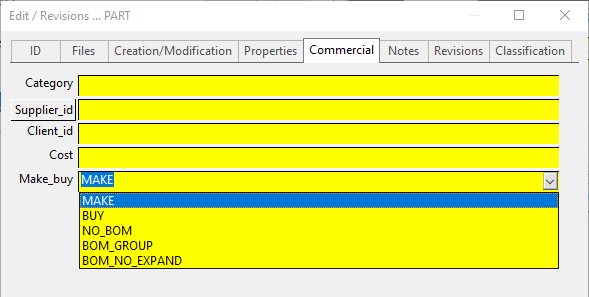
Field value |
Part |
Assembly |
Assembly's Drawing(s) |
Generic |
|---|---|---|---|---|
MAKE |
The part is manufactured and is included in the BOM. |
The assembly is manufactured and is included in the BOM. |
|
|
BUY |
The part must be purchased and is included in the BOM. |
The assembly is included in the BOM, but as a whole, so none of its parts is enlisted in the BOM. |
|
|
NO_BOM |
The part must not be included in the BOM. |
Neither the assembly nor any of its parts are enlisted in the BOM. |
|
|
BOM_GROUP |
|
Traverse down in the components of the document without incrementing the level of nesting in the BOM and without displaying the document itself. Open section below for activation and example. |
|
|
BOM_NO_EXPAND |
The sub-assembly is manufactured, but you want it to be displayed as an atomic entity |
This attribute is very similar to the BUY attribute; it is only needed when you don't want to traverse down all the components of a sub-assembly, but you don't want also to mark the sub-assembly as BUY, because you actually produce it in your factory. |
|
|
By default every new document is marked as MAKE.
Note that it is possible to overrule the value of the DOCUMENT table introducing the value in the PARENT_CHILD. Read the topic Commercial property MAKE/BUY depending on the assembly context for the details.
Change the default MAKE_BUY value using the parameter file MAKE_BUY.LST
It is possible to set the default value in the list of field values using the keyword .DEFAULT as the first line.
The following example is valid for english and sets the default to BUY:
.DEFAULT BUY
MAKE
BUY
NO_BOM
BOM_GROUP
BOM_NO_EXPAND
Understand MAKE_BUY field values
BOM_GROUP in detail
To enable this feature, you need to edit the following files adding the proper localized value as indicated in the following table:
Language |
File Name |
Value to add |
|---|---|---|
English |
LST\MAKE_BUY.LST |
BOM_GROUP |
Italian |
LST\FAI_ACQUISTA.LST |
GRUPPO_DISTINTA |
German |
LST\KAUFTEIL.LST |
STUCKLISTE_GRUPPEN |
French |
LST\PRODUIRE_ACHETER.LST |
NOMENCLATURE_GROUPE |
Spanish |
LST\FABRICAR_COMPRAR.LST |
LDM_GRUPO |
Remember that the file must finish with an empty line.
To better explain the purpose of this enhancement, consider the following example.
Example
Suppose you have the tree structure:
A1 |
|
|
MAKE |
|---|---|---|---|
+ |
A2 |
|
MAKE |
|
+ |
P1 |
MAKE |
|
+ |
P2 |
MAKE |
+ |
P3 |
|
MAKE |
The Buy List hierachical output would be like:
L1 |
L2 |
L3 |
Count |
... |
|---|---|---|---|---|
A1 |
|
|
1 |
|
|
A2 |
|
1 |
|
|
|
P1 |
1 |
|
|
|
P2 |
1 |
|
|
P3 |
|
1 |
Changing the attribute of A2 to BOM_GROUP:
A1 |
|
|
MAKE |
|---|---|---|---|
+ |
A2 |
|
BOM_GROUP |
|
+ |
P1 |
MAKE |
|
+ |
P2 |
MAKE |
+ |
P3 |
|
MAKE |
would produce the Buy List output:
L1 |
L2 |
Count |
... |
|---|---|---|---|
A1 |
|
1 |
|
|
P1 |
1 |
|
|
P2 |
1 |
|
|
P3 |
1 |
BOM_NO_EXPAND in detail
To enable this feature, you need to edit the following files adding the proper localized value as indicated in the following table:
Language |
File Name |
Value to add |
|---|---|---|
English |
LST\MAKE_BUY.LST |
BOM_NO_EXPAND |
Italian |
LST\FAI_ACQUISTA.LST |
NO_ESPANSIONE_DISTINTA |
German |
LST\KAUFTEIL.LST |
STUCKLISTE_NICHT_EXPANDIERT |
French |
LST\PRODUIRE_ACHETER.LST |
NOMENCLATURE_NO_ETEND |
Spanish |
LST\FABRICAR_COMPRAR.LST |
LDM_NO_EXPANDE |
Remember that the file must finish with an empty line.
To better explain the purpose of this enhancement, consider the following example.
Example
Suppose to have the tree structure:
A1 |
|
|
MAKE |
|---|---|---|---|
+ |
A2 |
|
MAKE |
|
+ |
P1 |
MAKE |
|
+ |
P2 |
MAKE |
+ |
P3 |
|
MAKE |
The Buy List hierachical output will be like:
L1 |
L2 |
L3 |
Count |
... |
|---|---|---|---|---|
A1 |
|
|
1 |
|
|
A2 |
|
1 |
|
|
|
P1 |
1 |
|
|
|
P2 |
1 |
|
|
P3 |
|
1 |
Changing the attribute of A2 to BOM_NO_EXPAND:
A1 |
|
|
MAKE |
|---|---|---|---|
+ |
A2 |
|
BOM_NO_EXPAND |
|
+ |
P1 |
MAKE |
|
+ |
P2 |
MAKE |
+ |
P3 |
|
MAKE |
would produce the Buy List output:
L1 |
L2 |
Count |
... |
|---|---|---|---|
A1 |
|
1 |
|
|
A2 |
1 |
|
|
P3 |
1 |
BOM in detail
The use of this value for drawings is as follows:
1.enable the option Revision → Approval → Always update assembly bom position with drawing bom positions
2.make sure to have at least 2 drawings of the same assembly that have a Solidworks BOM in it
3.in order to decide from which drawing read the pos numbers, DBWorks will look into the MAKE_BUY BOM attribute
Remember this takes place at assembly approval time
Show MAKE_BUY value in Trees
You can visualize the MAKE_BUY field in trees, filtering it against the MAKE value or not. Read here how to procede.